
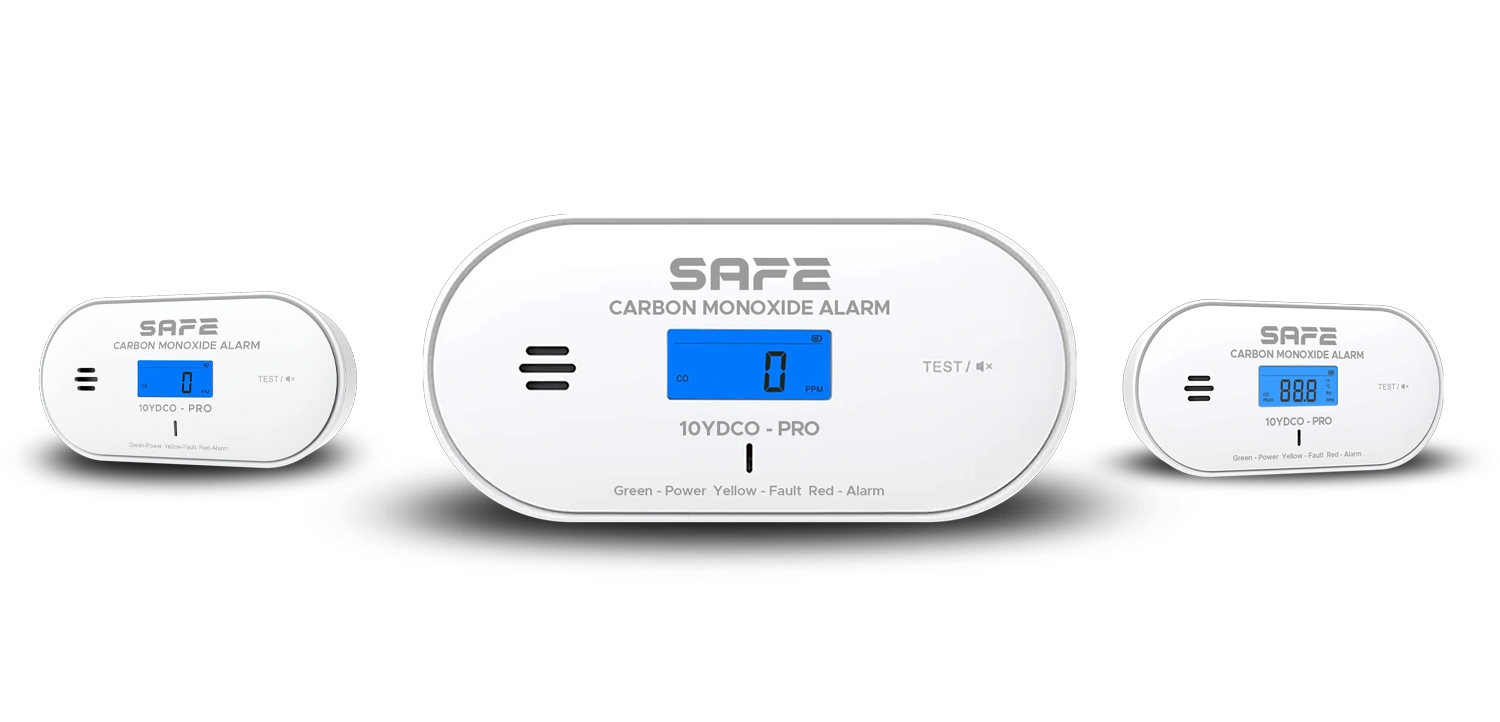
A new generation of wireless carbon monoxide detector with breakthrough detection using a second-generation electrochemical sensor and a colour LCD display with environmental functions, which can work as part of the FireSafe fire safety system with the support of the FireSafe Hub, or completely standalone. Power is supplied by an integrated lithium battery (built in, non-replaceable) guaranteeing exceptionally long operation of the device of more than 10 years and an extended 10-year warranty on both the battery and the device itself.
Foreword
General
This user manual describes the installation, functions and operation of the wireless carbon monoxide detector (hereinafter the “detector”). Read the manual carefully before using the device and keep it for future reference. Study the manual regularly and go through the possible emergency procedures for a CO alarm with all members of your household.
Safety instructions
The following signal words may appear in the user manual:
| Signal word | Meaning |
|---|---|
| NEBEZPEČÍ | Indicates a high potential hazard which, if not avoided, may result in death or serious injury. |
| VAROVÁNÍ | Indicates a medium or low potential hazard which, if not avoided, could result in minor or moderate injury. |
| UPOZORNĚNÍ | Indicates a potential risk which could lead to property damage, data loss, reduced performance or an unpredictable result. |
| TIP | Provides methods to help you solve a problem or save time. |
| POZNÁMKA | Provides additional information, such as emphasis or a supplement to the text. |
Revision history
| Version | Revision content | Release date |
|---|---|---|
| V1.0.0 | First release. | September 2026 |
| V1.0.1 | Colours according to the FireSAFE brand (red). | October 2026 |
| V1.0.2 | Technical specifications corrected according to the manufacturer's documents. | October 2026 |
Privacy notice
As a user of the device or a data controller, you may collect the personal data of others. You must comply with local privacy laws and regulations in order to protect the legitimate rights and interests of other people by taking appropriate measures.
About the manual
- The user manual serves as a reference only. Minor differences may occur between the information provided and the product.
- We are not liable for damage resulting from use of the product in a manner that is not in accordance with the instructions in the user manual.
- The manual will be updated in line with the current laws and regulations of the relevant countries. You can find the latest version on our website.
- Printing errors or deviations may occur in the description of functions, operations and technical data. In case of doubt or dispute, we reserve the right of final interpretation.
- If you encounter any problems while using the device, visit our website or contact customer service.
Important precautions and warnings
This section contains information on the correct handling of the product, risk prevention and prevention of property damage. Read it carefully before using the device and follow the instructions provided while using it.
Operating requirements
- Under no circumstances ignore the detector's alarm – such behaviour could lead to serious injury or death.
- Do not attempt to open or disassemble the detector. There is a risk of electric shock when handling the detector, and of the detector failing or malfunctioning.
- Exposing the detector to high or low temperatures or high humidity may considerably shorten the battery life.
- Before use, make sure that the detector's power has been activated by pulling out the blocking clip.
- Use the device in accordance with the instructions given for the operating environment.
- Transport, use and store the device under the humidity and temperature conditions permitted by the manufacturer.
- Do not expose the product to water or moisture, or to dripping or splashing water.
- Do not insert any objects into the ventilation openings of the product, do not cover the product and prevent water or other liquids from entering the detector.
- This detector is intended only to indicate the presence of carbon monoxide; it does not detect smoke, flame, temperature or other gases.
- This device is not intended for use by persons with reduced physical, sensory or mental capabilities or a lack of experience and knowledge, unless they have been supervised or instructed in the use of the detector by a person responsible for their safety.
- Fumes or gases, e.g. from cooking or from the use of cleaning agents, thinners, polishes or paints, may contaminate the detector's sensor and affect the reliability of the device in the short or long term.
Installation requirements
- Incorrect installation and operation of this device will prevent it from functioning correctly and consequently from responding to the danger of carbon monoxide.
- This device must be installed by a competent person and in accordance with the manufacturer's instructions.
- Installing this detector to monitor CO concentration does not replace the correct installation, use and maintenance of fuel-burning appliances, including adequate ventilation and extraction systems.
- Before installation, read carefully the chapter Choosing the installation location regarding the correct choice of location for the CO detector.
- Do not expose the product to direct sunlight, extreme cold, humidity or sudden changes in temperature.
- Before using and activating the device, you must stick the information labels in your language onto it (see chapter Installing the detector).
What to do in the event of a CO alarm
If the detector detects a dangerous concentration of carbon monoxide, it sounds a loud alarm signal (85 dB) accompanied by a visual indication from the red LED indicator. This is a sequence of warnings: every 5 seconds 4 short beeps of the buzzer accompanied simultaneously by 4 flashes of the red LED indicator at regularly repeating intervals, while the blue-backlit display of the detector shows the current measured CO concentration in ppm.
- Stay calm and open all doors and windows. Stop using all fuel-burning appliances and, if possible, make sure they are switched off (e.g. close the emergency valve on gas appliances).
- Press the button TEST/Silence to temporarily silence the alarm (for 9 minutes). If the warning signal continues to persist, inform the other occupants and evacuate the building – leave the doors and windows open and do not return to the premises.
- Obtain medical help for anyone suffering from symptoms of CO poisoning (headache, nausea) and tell the doctor that carbon monoxide inhalation is suspected.
- Call the emergency number 112, the gas supplier on its emergency number, or the appliance service organisation. Make sure the source of the CO leak is identified and eliminated.
If the area is ventilated after the alarm has sounded, the carbon monoxide may disperse before help arrives. Even in that case, it is necessary to identify the source of the CO leak and have its cause eliminated. Do not start using any fuel-burning appliances again until they have been checked and cleaned by a competent person in accordance with national regulations.
Time to alarm as a function of CO concentration
| CO concentration | Time to alarm |
|---|---|
| 30 ppm | 120 min |
| 50 ppm | 60 to 90 min |
| 100 ppm | 10 to 40 min |
| 300 ppm | within 3 min |
About carbon monoxide (CO)
What is carbon monoxide
Carbon monoxide is the main gaseous product of incomplete (uncontrolled) burning of carbon-based materials. It is a colourless, non-irritating gas with no taste or smell, whose toxic effects impair the blood's ability to carry oxygen. Exposure to a high concentration of CO can lead to serious tissue damage or have fatal consequences. The severity of poisoning depends on the concentration (ppm) and the length of exposure – CO is a cumulative poison, and long-term exposure to low concentrations (>10 ppm) can also cause symptoms.
| CO concentration (ppm) | Effects on adults |
|---|---|
| 100 ppm | Mild headache, nausea, fatigue (flu-like symptoms) |
| 200 ppm | Dizziness and headache within 2–3 hours |
| 300 ppm | Nausea, headaches in the temples and forehead, drowsiness, disorientation and rapid heartbeat; life-threatening after more than 3 hours of exposure |
| 400 ppm | Severe headaches, convulsions, failure of vital organs; death may occur within 2–3 hours |
- This device may not prevent the effects of continuous exposure to carbon monoxide and will not fully protect individuals with specific medical conditions.
- The device detects only carbon monoxide (CO); it does not detect other gases, smoke or flame. If there is any doubt about the cause of the signalling, a dangerous CO level is assumed and the occupants should be evacuated.
Possible sources of carbon monoxide
CO is produced by the incomplete combustion of carbon-based fuels (coal, wood, charcoal, heating oil, paraffin, petrol, propane, butane, natural gas).
- Fuel-burning appliances – gas boilers, heaters, cookers, wood, solid-fuel or pellet stoves, fireplaces, charcoal barbecues, especially when poorly maintained or inadequately ventilated.
- Equipment with internal combustion engines – portable generators, cars, lawnmowers – pose a deadly danger in enclosed spaces (garages, utility rooms).
- Portable gas heaters, warmers or barbecues (gas and charcoal) used indoors.
- Blocked or obstructed flue gas routes, flues and chimneys.
- Other sources: large amounts of tobacco smoke, town gas, or emissions from neighbouring flats in multi-occupancy buildings through shared or poorly positioned flues.
Basic steps to protect against CO poisoning
- Install one or more carbon monoxide detectors in your home (see Choosing the installation location).
- Have a qualified technician inspect your heating system and fuel-burning appliances (boilers, gas, oil and other similar appliances) every year.
- Have a qualified technician inspect and professionally clean your flue gas routes (flues, chimneys) every year.
- Make sure that fuel-burning appliances and engines are used only in very well-ventilated spaces.
- Use gas appliances according to the manufacturer's recommendations. Never use a gas cooker or oven to heat a room.
- Do not use barbecues indoors or in an adjoining garage.
Functional elements
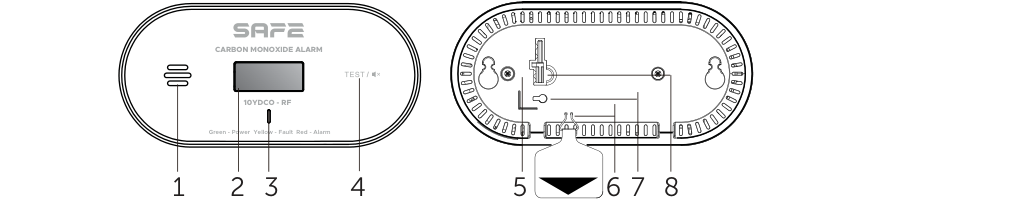
- Buzzer – provides acoustic information (85 dB) on the states of the device's individual modes, accompanied by visual signalling from the LED indicator.
- LCD display – multifunction display showing temperature and humidity alternately in standby mode and the current CO concentration in ppm in alarm mode.
- LED indicator – three-colour LED indicator (red – alarm, green – power, yellow – fault) accompanied by acoustic signalling from the buzzer.
- TEST / Silence button – verifies the functionality of the device and is used to temporarily silence the acoustic alarm signal, recall the memory of the highest measured values and reset.
- Battery location (back) – built-in battery, not user-replaceable.
- Blocking clip – removing it activates the device's built-in battery.
- Deactivation port – port for inserting the deactivation pin.
- Deactivation pin – for permanent deactivation of the built-in battery before disposal.
Principle of operation
The SAFE 10YDCO-RF detector continuously monitors, detects and signals the presence of carbon monoxide in residential areas using advanced second-generation electrochemical sensor technology with high sensitivity and stable performance, capable of detecting even very low concentrations of CO (from 30 ppm). Throughout its service life (more than 10 years) the sensor requires no further calibration. The detector is controlled by a microprocessor with a predictive algorithm and signals danger both visually and acoustically.
The detector includes an integrated RF module which, thanks to the CONNECTED function, makes it possible to wirelessly link two or more FireSafe devices (maximum 24 units) and thus create an interlinked wireless network – see more in the chapter Interconnection. A FireSafe Hub can also be added to the network, which monitors the operation of all connected detectors and, if danger is detected, immediately informs the user by push notifications in the FireSafe app.
The detector is type A, intended for both fixed and portable installations, and is certified in accordance with the European standard EN 50291-1:2018 for carbon monoxide detectors in residential premises.
Multifunction LCD display
The backlit LCD display alternately shows, in standby mode, the current room temperature (accurate to ±0.1 °C) and humidity (accurate to ±1.5 % RH), approximately every 5 seconds. The temperature display can be switched between degrees Celsius and Fahrenheit by pressing the TEST/Silence button during active test mode. In alarm mode, the display shows the current CO concentration in ppm on a blue backlit background.
Highest-reading memory
The detector has a highest-reading memory function – it records the highest measured CO concentration even while you are away. Pressing and holding the TEST/Silence button recalls this value on the display since the last memory reset; to reset, hold the button in test mode.
Temporary alarm silencing
If the detector detects the threshold CO concentration level, it triggers the alarm warning signal. If necessary, the acoustic signal can be temporarily silenced by pressing the TEST/Silence button for 9 minutes. The detector indicates temporary silence mode with the red LED indicator, which flashes 4 times every 5 seconds without an accompanying buzzer sound. If the CO concentration subsequently falls below the specified value, the detector automatically returns to normal operating mode. Temporary silencing of the alarm is possible only when the CO concentration is below 300 ppm.
Interconnection
The detector can be linked by pairing only with wirelessly linkable FireSafe devices. It is not intended for communication with wirelessly linkable devices of other brands or manufacturers. The interlinked network operates at a frequency of 868 MHz, with a range of up to 1 000 m in open space and support for up to 24 devices FireSafe CONNECTED. If one of the devices in the network raises an alarm, it transmits a radio signal and all other units connected to the network will respond to the alarm as well.
Before linking, make sure that all devices are activated (by pulling out the blocking clip) and powered.
- Entering pairing mode – on the first device, press the TEST/Silence button briefly 4 times in a row (the interval between presses shorter than 1 second). The device emits a short acoustic tone and the LED indicator flashes red approximately once every 0.5 s to indicate that it has entered pairing mode (for 3 minutes).
- Connecting the second device – on the second device, press the TEST/Silence button briefly 2 times in a row. The device emits a short tone and the red LED indicator flashes faster (approximately once every 0.25 s) to indicate transmission mode.
- Confirming pairing – after successful pairing, the second device emits a short sound signal and the LED indicator flashes green until the first device leaves pairing mode (or until the button on the second device is pressed).
- Connecting further devices – while the first device is in pairing mode, repeat step 2 for each further device (2 button presses). Using this procedure, up to 24 FireSafe wireless devices can be linked into the network.
- Checking functionality – once all the devices have been linked, test the whole wireless network (see chapter Functionality test).
Adding to the FireSafe app
A FireSafe Hub can be added to the wireless network of detectors – a key element of the system which, thanks to its internet connection, allows convenient setup and remote control using the free mobile app FireSafe (for Android and iOS). The Hub monitors the operation of all connected detectors and, if danger is detected, immediately informs the user by push notifications. If you connect to the Hub a device that is already part of a standalone wireless network, all the devices in that network will connect to the Hub at once.


Commissioning the FireSafe Hub
- Connect your smartphone to a Wi-Fi network and install the FireSafe app.
- Connect the FireSafe Hub to a power supply and to the internet (via an Ethernet cable or Wi-Fi).
- Launch the app and carry out the basic setup.
- In the app, tap the (+) button to add a device, scan the QR code on the back of the Hub and enter the required details.
- Confirm that the Hub has been added successfully and tap the Save button.
Pairing the detector with the Hub
- On the Hub, press the button three times in quick succession PAIRING (less than 1 second between presses) – the Hub's LED indicator will flash green to indicate pairing mode.
- On the detector, press the TEST/Silence button three times in quick succession. The detector emits a short beep and the green LED indicator flashes approximately once every 0.25 s to indicate pairing.
- Once the device has been added successfully, the detector emits a short beep and the LED indicator flashes green slowly for one minute, then switches to normal operating mode.
- To add another detector, first exit pairing mode on the device that has just been paired by pressing the TEST/Silence button, then repeat step 2. If the Hub's pairing interval (1 minute) expires, switch the Hub back to pairing mode.
States and signalling
The detector signals its individual operating states using a combination of an LCD display, a three-colour LED indicator and an acoustic buzzer:
| Mode | LCD display | LED indicator | Buzzer |
|---|---|---|---|
| Activation | Backlight on for 3 s | No signalling | No signalling |
| Standby mode | Temperature and humidity alternately | Green once every 60 s | No signalling |
| Alarm | CO concentration in ppm | Red 4× every 5 s | 4 short beeps every 5 s |
| Testing | Icons and values (CO, PEAK, temperature, humidity) | Green, yellow, red (6×), pause, repeat | 4 beeps, pause, 4 beeps, 1 beep |
| Highest recorded value | Most recent peak CO concentration | Green 4× every 5 s | Short beep every 3 s |
| Temporary silence | CO concentration in ppm | Red 4× every 5 s | No signalling |
| Low battery voltage | Temperature / humidity alternately | Yellow once every 60 s | 1 beep every 60 s |
| Fault | CO concentration in ppm | Yellow twice every 60 s | 1 beep every 60 s |
| End of life | Temperature / humidity alternately | Yellow 3× every 60 s | 3 beeps every 60 s |
Choosing the installation location
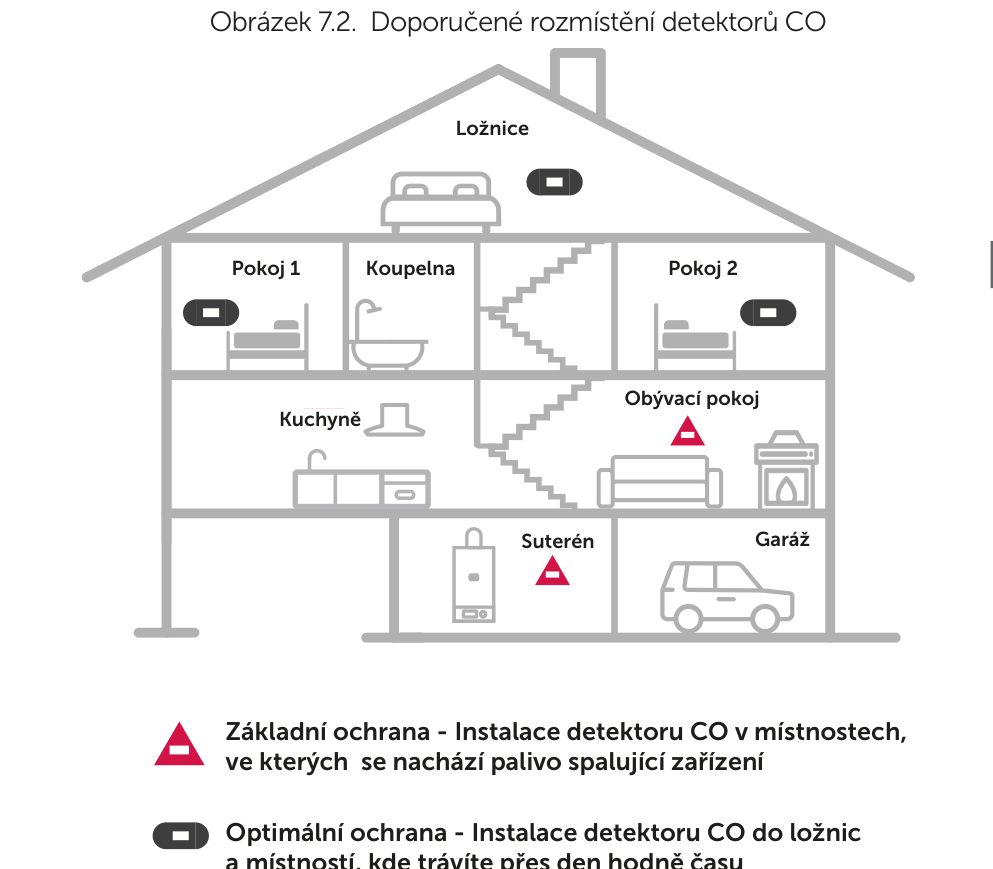
CO detectors should ideally be installed in all rooms containing a fuel-burning appliance. We strongly recommend installing additional detectors in bedrooms and in rooms where you spend a lot of time during the day – in places where you will hear the signal even when asleep (e.g. on the bedside table in a bedroom).
Which rooms to install in
Install a detector in every room containing a fuel-burning appliance as a priority. Install further devices so that the signal is audible to occupants of remote rooms (living rooms, all bedrooms) as well. If there are several appliances and the number of detectors is limited, consider:
- placing one in the room with appliances without a flue or with an open exhaust,
- placing one in the room where users spend the most time,
- in a living bedroom, placing it as far from the cooker as possible but as close as possible to where people sleep,
- if the appliance is in an unused room (e.g. a boiler room), positioning the detector so that the signal is better audible,
- if the appliance has an extended or concealed flue, installing a detector in every room through which the flue passes.
Where in the room to install
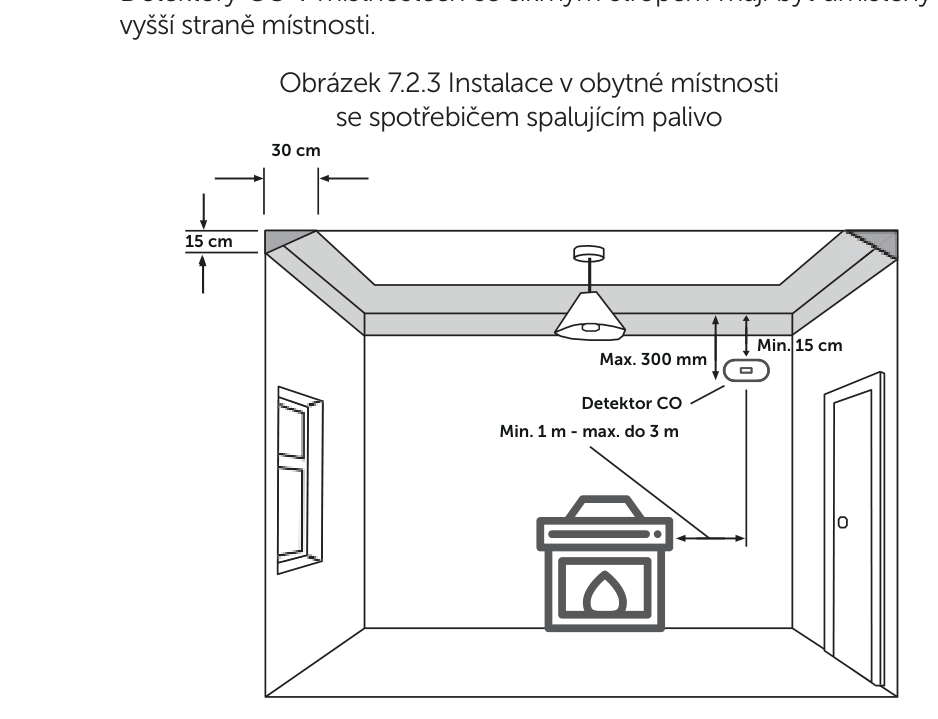
A room with a fuel-burning appliance (stove, boiler, gas fireplace, fireplace): CO rises with the warm mixture of gases, so install the detector above the level of the appliance and close to the ceiling:
- the top edge of the detector at least 15 cm from the ceiling, the bottom edge at most 30 cm from the ceiling,
- above the level of the top edges of windows and doors,
- at a distance of at least 1 m and at most 3 m (horizontally) from the edge of the nearest potential source of CO,
- if there are partitions in the room, on the same side as the potential source of CO,
- in a room with a sloping ceiling, on the higher side of the room.
Bedrooms or rooms remote from the appliance (corridors, landings): install the detector on the wall at a height of 1,5–1,6 m above the floor, near the users' breathing zone. Never install the detector at floor level – carbon monoxide is lighter than air and only rarely settles near the floor.
Where not to install the detector
- In an enclosed space (e.g. in a sideboard or behind a curtain) or near a door or window.
- Directly above a sink, in a garage with vehicles starting up, near heat sources or air-conditioning vents.
- In close proximity to a cooker, hobs or deep fat fryers – there is a risk of sensor contamination.
- At or near floor level.
- In places exposed to direct sunlight, extreme cold, moisture or sudden changes in temperature.
- In areas of extreme humidity (>95 %) – bathrooms, showers; or directly above a sink or near dishwashers and washing machines.
- Where there is a risk of contamination by insects, dust or dirt.
- Where it may be built in or covered (curtains, furniture) or detection may otherwise be restricted.
- Near a cooker hood, ventilation openings or places with strong air flow.
- In rooms where the temperature can drop below −10 °C or rise above 55 °C (garage, unfinished loft).
- In areas with restricted or dangerous access – the device must be tested and maintained regularly.
Installing the detector
The SAFE 10YDCO-RF detector can be installed in two ways – fixed wall mounting, or free-standing on a horizontal surface thanks to the two stabilising feet on the base of the device.
Wall mounting
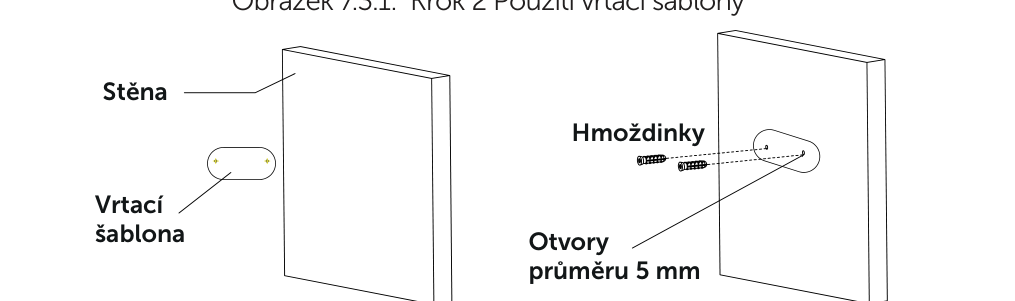
- Following the chapter Choosing the installation location select a suitable location.
- Using the supplied drilling template, drill holes (⌀ 5 mm) at the installation location and insert wall plugs into them.
- Insert the self-tapping screws into the wall plugs and tighten them so that a gap of approximately 5 mm remains between the screw head and the wall.
- From the set of information labels, stick labels A and B on the front of the device and label C on the back, in the required language.
- Activate the detector by pulling out the blocking clip on the back of the device.
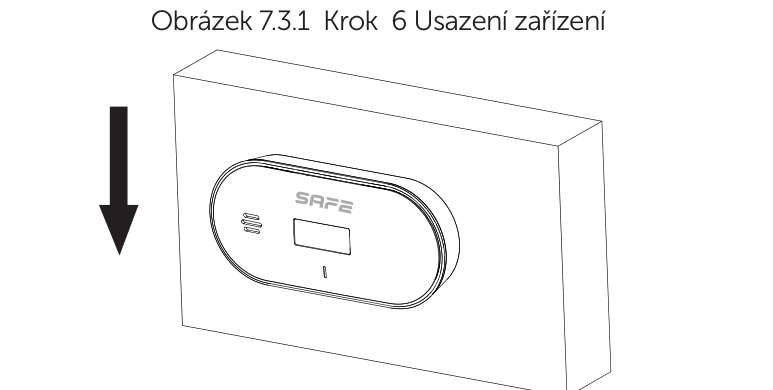
- Place the detector body onto the heads of the self-tapping screws and slide it downwards until it locks securely into position.
- Test the device by pressing the TEST/Silence button – check that the LED indicator, buzzer and LCD display work correctly (see Functionality test).
Free-standing installation on a horizontal surface
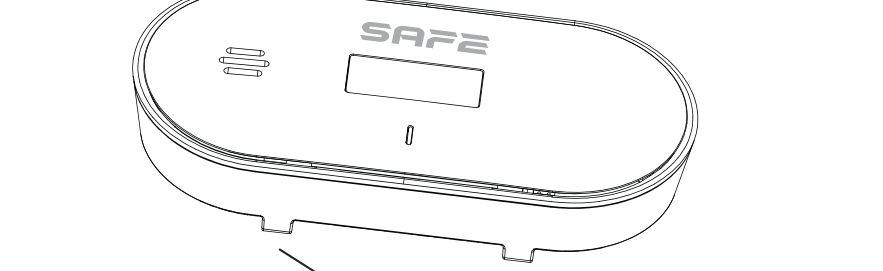
The detector base has two feet that allow flexible and stable freestanding installation on a horizontal surface (shelf, bedside table, windowsill, etc.) without the need for drilling.
- For free-standing installation, the detector must be placed in an upright position – it must not be laid flat on a horizontal surface.
- Place it so that there is no risk of it being knocked over, falling or being otherwise damaged.
- Even for free-standing installation, observe the recommended placement described in the chapter Choosing the installation location.
Functionality test
After installation, after replacing the battery, or as part of regular maintenance, test the CO detector. We recommend carrying out an alarm test simulation at least once a week.
- Briefly press the TEST/Silence button – the blue backlight of the LCD display lights up for 5 seconds.
- While the display is backlit, press the TEST/Silence button again – the device activates test mode.
- For 5 seconds, the display alternately shows information icons together with the current CO concentration, the most recent highest recorded value, the temperature and the humidity. At the same time, the buzzer sounds 4 short beeps accompanied by 6 flashes of the LED indicator (green, yellow, red, green, yellow, red), then a pause, a repeat, and finally 1 beep with a simultaneous flash of the red LED.
To test devices linked in a wireless network without a Hub, press and hold the TEST/Silence button on any detector – the other connected detectors indicate receipt of the test signal with one short tone and a flash of the LED. To test devices connected via a Hub, select the detector in the FireSafe app and press the Test.
Maintenance
- Clean the detector at least once a month – remove accumulated dust particles from the ventilation openings around the perimeter with a vacuum cleaner and wipe the outside with a damp cloth. After cleaning, test the device using the TEST/Silence button. Do not use cleaning solutions or solvents – there is a risk of sensor contamination and loss of warranty.
- Do not use methane, propane, isobutene, isopropanol, ethylene, benzene, toluene, ethyl acetate, hydrogen sulphide, hydrogen, sulphur dioxide, alcohol-based products, paints, thinners, solvents, adhesives, hairsprays, aftershaves, perfumes or certain cleaning products near the detector – they may temporarily or permanently affect the sensitivity of the sensor or cause a false alarm.
- Do not paint the device – the paint could seal the air circulation openings.
- Do not place the detector in locations prone to vibration and shocks, or near open flames.
- Do not disassemble the detector or interfere with its internal circuits – this will result in loss of the warranty. Servicing may only be carried out by the manufacturer's authorised service centre.
- A high concentration of tobacco smoke, fumes from waterproofing materials, or hydrogen produced when charging certain batteries may also trigger a false alarm.
Troubleshooting common problems
| Problem | Possible solution |
|---|---|
| The green LED indicator does not flash at regular intervals of once every 60 s | Remove the blocking clip to activate the built-in power battery; if the problem persists, contact technical support |
| Pressing the TEST/Silence button does not trigger the warning signal, or the detector registers CO but does not trigger the acoustic signal | Possible hardware fault – contact your supplier or technical support |
| The device emits a continuous warning tone | The detector may be responding to a large amount of volatile substances (alcohol, perfume, petrol, paint) – move it to a place with clean air and leave it running for approx. 2 hours; if the problem persists, contact support |
End of life
Power is supplied by an integrated 3 V lithium battery (built in, non-replaceable), which guarantees operation of the detector for more than 10 years from activation. After this period has elapsed, the detector must be replaced with a new one – the replacement date is shown on the information label on the back of the device next to the text “Replacement date”.
The detector signals that its end of life is approaching by flashing the yellow LED indicator 3 times, accompanied by 3 beeps of the buzzer, at regular 60-second intervals for 30 days before operation permanently ends.
Before disposing of the device after 10 years of operation, the built-in battery must be deactivated:
- Peel off the information label on the back of the device and remove the deactivation pin using a flat-blade screwdriver.
- Insert the pin into the deactivation port, push it in and turn it. If the LCD display stops showing any information, the built-in battery has been deactivated successfully.
Technical specifications
| Detection parameters | |
| Detection type | Carbon monoxide (CO) |
| Sensor | Electrochemical CO sensor, 2nd generation |
| Detection sensitivity | From 30 ppm |
| Device type | A (fixed and portable installation) |
| Microprocessor | AI SAFE with predictive algorithm |
| Calibration | Not required during the service life of the sensor |
| Time to alarm | 30 ppm: 120 min · 50 ppm: 60–90 min · 100 ppm: 10–40 min · 300 ppm: <3 min |
| Detection certification | ČSN EN 50291-1:2018; ČSN EN 50291-1:2018/AC:2021 |
| Wireless linking | |
| Operating frequency | 868 MHz |
| Signal range | Up to 1,000 m in open space |
| Max. number of linked devices | 24 units of the FireSafe CONNECTED type |
| Communication type | Two-way |
| Interfaces and functions | |
| Indication | 3× LED indicator (red, green, yellow) + LCD display |
| Controls | 1× TEST / Silence / value memory recall button |
| Alarm signalling | Acoustic (≥85 dB at 3 m) and visual (LED + backlit LCD) |
| Silencing the alarm | Manually by button, for 9 minutes |
| Environmental functions | Temperature display (±0.1 °C) and humidity display (±1.5 % RH) |
| Highest-reading memory | Yes |
| Low battery warning | Yes, 30 days in advance |
| End-of-life signalling | Yes, 30 days in advance |
| General | |
| Power supply | 3 V DC, 1× CR17450A lithium battery (integrated, non-replaceable) |
| Power consumption | Standby mode ≤20 µA; in alarm ≤20 mA |
| Battery / device life | 10 years from activation |
| PCB protection | IZOVAX insulating and protective varnish layer with nanoparticles |
| Mounting method | On a wall, or free-standing on a horizontal surface |
| Type of installation | Indoor |
| Degree of protection | IP30 |
| Operating temperature | −10 °C to +55 °C |
| Operating humidity | Up to 95 % relative humidity, non-condensing |
| Storage temperature | −20 °C to +60 °C |
| Storage humidity | 5–95 % relative humidity, non-condensing |
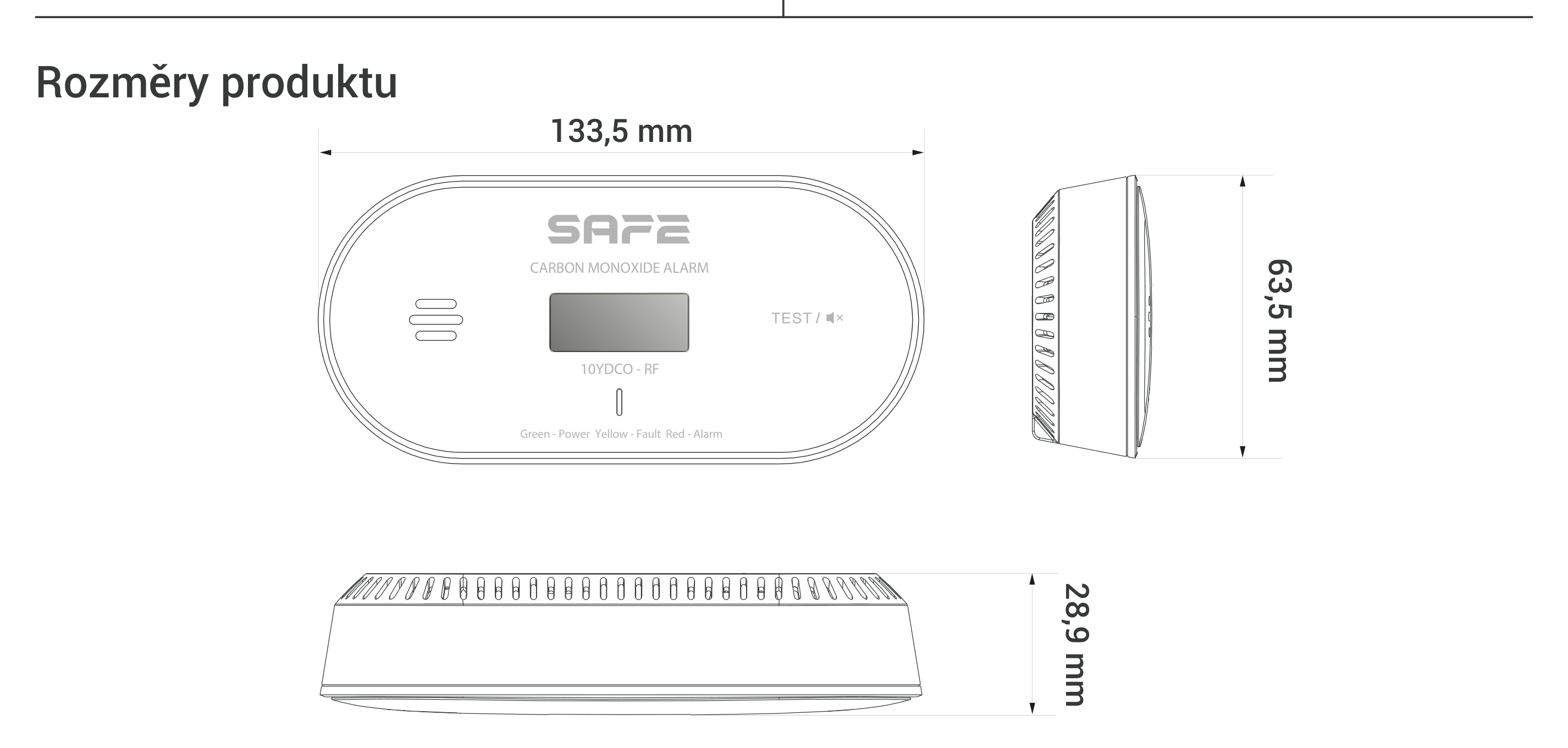
| Dimensions | 133.5 × 63.5 × 28.9 mm |
| Weight | 122 g (including battery) |
| Package dimensions / weight | 45 × 80 × 135 mm, 193 g |
| Carton | 540 × 430 × 335 mm, 96 pcs, 20.1 kg |
| Certification | ČSN EN 50291-1:2018; ČSN EN 50291-1:2018/AC:2021; BS EN 50291-1:2018; EN 62479:2010; EN 301 489-1; EN 301 489-3; EN 300 220-2; EN 50270:2015 |
| Declaration of Conformity | CE |
| EAN | 0703123018241 |
| Warranty | 10 years (on the device and battery) |
Package contents
- SAFE 10YDCO-RF wireless CO detector – 1 pc
- Drilling template – 1 pc
- Self-tapping screws – 2 pcs
- Wall plugs – 2 pcs
- User manual with a set of information labels – 1 pc
Safety notices
- Read these instructions carefully before use and keep them for future reference and for any subsequent user.
- Under no circumstances ignore the detector's alarm signalling – such behaviour could lead to serious injury or death.
- Do not attempt to open or disassemble the detector – there is a risk of electric shock, failure or malfunction of the device.
- Exposing the detector to high or low temperatures or high humidity may considerably shorten the battery life.
- Before using the device, make sure the power is activated by pulling out the blocking clip.
- Transport, use and store the device only under the humidity and temperature conditions permitted by the manufacturer. Do not expose it to water, moisture, or dripping or splashing water.
- Do not insert any objects into the ventilation openings, do not cover the device and prevent water or other liquids from entering.
- The detector serves only to indicate the presence of carbon monoxide – it does not detect smoke, flame, temperature or other gases or hazards.
- The device is not intended for use by persons with reduced physical, sensory or mental capabilities, or by persons lacking sufficient experience and knowledge, unless they are supervised or have been instructed by a person responsible for their safety. Children must be supervised to ensure that they do not play with the device.
- This device must be installed by a competent person in accordance with the manufacturer's instructions; installation does not replace the correct installation, use and maintenance of fuel-burning appliances, including adequate ventilation.
- The battery in the device is integrated and not user-replaceable. Before disposing of the device at the end of its life, deactivate the battery using the procedure in the chapter End of life.
- Do not dispose of the product with general municipal waste or burn it – hand it in for recycling in the electrical equipment take-back system.
Warranty
An extended warranty is provided on the SAFE 10YDCO-RF detector 10 years from the date of sale, covering both the device itself and the built-in battery. The manufacturer's obligation under this warranty is limited to repairing or replacing the detector or its defective part, after the device has been sent, together with proof of purchase, to the address of the SAFE HOME europe s.r.o. service centre, Čechova 1005/4, 750 02 Přerov.
The warranty does not cover defects caused by failure to follow the instructions in this manual, or by damage, modification or misuse of the product. This warranty does not affect your statutory rights.
In case of problems with the device, first contact technical support – most situations can be resolved remotely.
Need help?
SAFE HOME europe technical support:
E-mail: info@safe-home.eu · Telephone: (+420) 581 222 262
Web: www.smart-safe.eu