
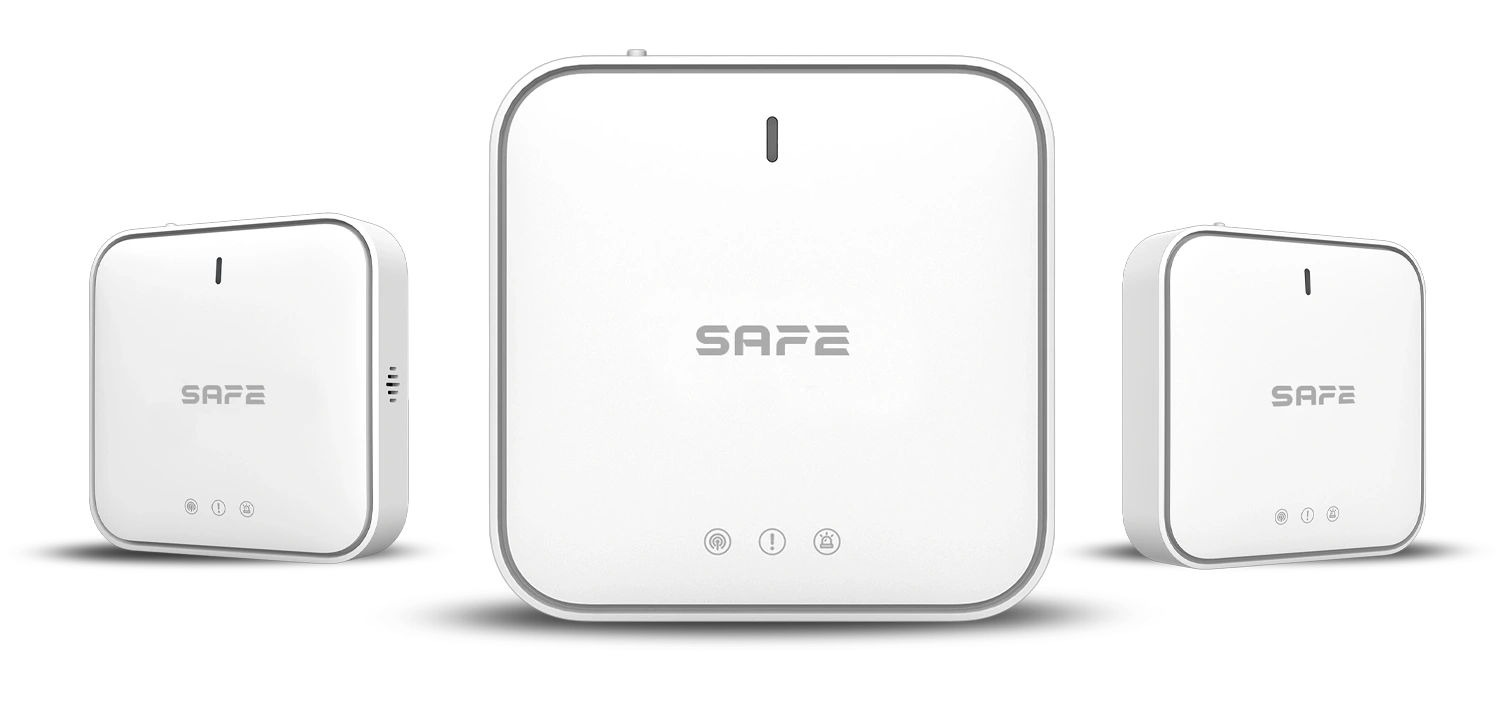
Smart control Hub SAFE 50HUB-WRF is the key element of the FireSAFE fire safety system. Using CONNECTED technology, it allows all FireSAFE safety devices to be connected, monitors their operation and, if danger is detected, immediately informs the system user on their mobile device through a free mobile app.
Foreword
General
This user manual describes the installation, functions and operation of the SAFE 50HUB-WRF Hub. Read the manual carefully before using the device and keep it for future reference.
Safety instructions
The following signal words may appear in the user manual:
| Signal word | Meaning |
|---|---|
| NEBEZPEČÍ | Indicates a high potential hazard which, if not avoided, may result in death or serious injury. |
| VAROVÁNÍ | Indicates a medium or low potential hazard which, if not avoided, could result in minor or moderate injury. |
| UPOZORNĚNÍ | Indicates a potential risk which could lead to property damage, data loss, reduced performance or an unpredictable result. |
| TIP | Provides methods to help you solve a problem or save time. |
| POZNÁMKA | Provides additional information, such as emphasis or a supplement to the text. |
Revision history
| Version | Revision content | Release date |
|---|---|---|
| V1.0.0 | First release. | September 2026 |
| V1.0.1 | Colours according to the FireSAFE brand (red). | October 2026 |
| V1.0.2 | Technical specifications corrected according to the manufacturer's documents. | October 2026 |
About the manual
- The user manual serves as a reference only. Minor differences may occur between the information provided and the product.
- We are not liable for damage resulting from use of the product in a manner that is not in accordance with the instructions in the user manual.
- The manual will be updated in line with the current laws and regulations of the relevant countries. For detailed information, see the printed user manual or visit our website. The electronic and printed versions may differ in minor details.
- All designs and software may be changed without prior written notice. As a result of product updates, certain differences may appear between the product and the information in the manual. The latest version of the software and supplementary documentation is available from customer service.
- Printing errors or deviations may occur in the description of functions, operations and technical data. In case of doubt or dispute, we reserve the right of final interpretation.
- All trademarks, registered trademarks and company names in the manual are the property of their respective owners.
- If any problems occur while using the device, visit our website, or contact your supplier or customer service.
Important precautions and warnings
This section contains information on the correct handling of the product, risk prevention and prevention of property damage. Read it carefully before using the device and follow the instructions provided while using it.
Operating requirements
- Before using the device, make sure the Hub is correctly connected to the power supply and the internet network.
- Do not pull the power cable out of the device while the power adapter is plugged into the mains.
- Use the device only within its rated power range.
- Use the device in accordance with the instructions given for the operating environment.
- Transport, use and store the device under the humidity and temperature conditions permitted by the manufacturer.
- Do not expose the product to water or moisture, or to dripping or splashing water.
- Do not insert any objects into the ventilation openings of the product, do not cover the product, and take care to prevent water or other liquid from entering the device.
- Do not disassemble the device.
Installation requirements
Incorrect installation and operation of this device will prevent it from functioning properly and, consequently, from responding to danger. Connect the device to the power supply before switching it on. Before connecting the device to the mains or to a power source using the power adapter:
- Strictly follow local electrical safety standards and make sure that the voltage in the area is stable and meets the device's power supply requirements specified by the manufacturer.
- Do not connect the device to more than one power source. Otherwise the device could be damaged and the warranty lost.
- When working at height, follow all safety procedures and use the required protective equipment intended for this purpose.
- Do not expose the product to direct sunlight, extreme cold, humidity or sudden changes in temperature.
- Installation and handling of this device must always comply with local electrical safety requirements, requirements for protection against electric shock and other relevant regulations.
- Install the device in a well-ventilated place and do not block its ventilation.
- Use only cables and power adapters approved and supplied by the device manufacturer to connect to the power source.
- The power supply and accessories must meet the requirements of the ES1 and IEC 62368-1 standards and must not exceed PS2. Please note that the requirements for the power supply specification are governed by the information on the rating label located on the back of the device.
- Bear in mind that Class I electrical appliances must be connected to a socket with protective earthing.
Functional elements
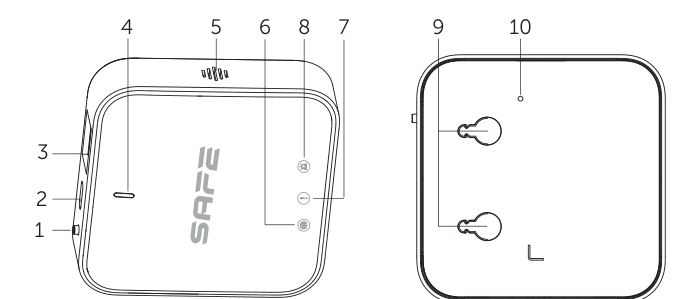
- PAIRING button – used to start or end the Hub's pairing mode:
- 1× press – ends pairing and switches the Hub to normal operating mode.
- 3 presses – the Hub enters pairing mode.
- 4× press – enters access point (AP) mode for setting up the Hub.
- 4 presses and a fifth press holding the button for 3 seconds – all LED indicators light up, the Hub and the other devices emit a beep and the Hub goes offline for 2 minutes. All FireSAFE devices are unpaired, except for camera devices.
- Power connector – 5 V DC / 1.0 A.
- Ethernet connector – for connecting a network cable with an RJ-45 connector.
- Power LED indicator – uses a green LED to show the power status and the mode of the device (for example, pairing mode).
- Speaker – uses sound at a volume of 70 dB to indicate the states of the individual device modes; the acoustic signalling is accompanied by visual signalling on the individual LED indicators.
- Blue COMMUNICATION LED indicator – lit when the Hub is in online mode; flashes briefly when the Hub has entered AP mode.
- Yellow FAULT LED indicator – lit when the Hub is in fault mode.
- Red ALARM LED indicator – lit when the Hub is in alarm mode.
- Mounting embossments – embossments for self-tapping screws when installing on a wall.
- Reset button opening – on the back of the Hub; to restore the factory settings, insert a small object into the opening and hold the button (see Reset and troubleshooting).
Principle of operation
The SAFE 50HUB-WRF Hub is the heart and, at the same time, the control element of the FireSAFE fire safety system. It can be wirelessly connected by pairing only to compatible wirelessly linkable FireSAFE elements. Once connected, the devices in the network can cooperate by exchanging data and passing it on to the user through the FireSAFE mobile app.
The Hub monitors the operation of all connected alarms, detectors and FireSAFE CONNECTED devices and, if danger is detected, immediately informs the system user by means of an alarm and alarm push notifications in the FireSAFE app. Thanks to its internet connection, it allows convenient configuration and control of the individual parts of the FireSAFE system, including remotely.
CONNECTED radio protocol
CONNECTED is a radio protocol designed for the FireSAFE wireless fire safety system. It uses the frequency band 868.0–868.6 MHz and allows communication between the individual elements of the system up to a distance of 1 000 m in open space without interference:
- two-way data transmission with integrity checking using the CRC8 method,
- if the radio signal is interfered with, the system alerts the user and automatically retunes to an interference-free frequency band,
- communication between the Hub and the cloud is secured by encryption TLS,
- virus protection is handled at software level.
Video verification and monitoring of zones of interest
The Hub allows FireSAFE overview IP cameras to be integrated into the system for verification of a fire event, FireSAFE IP thermal cameras for detecting rising temperature in monitored zones of interest (electric cars, e-bikes and e-scooters, battery storage, storage of lithium batteries, etc.) or FireSAFE IP cameras for detecting flame in a protected area. Only cameras compatible with the FireSAFE app are supported.
Capacity and linking
The Hub works as the access point of the FireSAFE system and supports the connection of up to 24 devices of the FireSAFE CONNECTED portfolio – smoke alarms and heat alarms, carbon monoxide detectors, detectors of flammable and explosive gases, environmental sensors and other components.
| Parameter | Value |
|---|---|
| Maximum number of linked devices | 24 units of the FireSAFE type |
| IP camera support | Yes (only cameras compatible with the FireSAFE app) |
| Radio signal range | Up to 1,000 m in open space |
| Communication type | Two-way, automatic frequency hopping |
Power supply
The Hub is powered from the mains by the supplied power adapter 100–240 V AC, 50/60 Hz. The adapter output to the Hub is 5.0 V DC / 1.0 A, and the power cable is 1 m long.
- Connect the Hub only to the power adapter and cable supplied by the manufacturer.
- Do not connect the Hub to more than one power source.
- Do not disconnect the power cable from the Hub while the power adapter is plugged into the mains.
Internet connection
The Hub supports two communication channels to the internet – a wired Ethernet network and a wireless Wi-Fi network. Once the Hub is connected to the internet, the FireSAFE system can be controlled and configured from the mobile app from anywhere.
| Channel | Description |
|---|---|
| Ethernet | A network cable with an RJ-45 connector plugs into the Ethernet connector of the Hub. 10 Mb/s / 100 Mb/s port. The Ethernet cable is not included in the package. |
| Wi-Fi | 2.4 GHz band only (IEEE 802.11b/g/n standard, 2400–2483.5 MHz). Wi-Fi networks in the 5 GHz band are not supported. The Wi-Fi transmission range is 50 m. |
Access point (AP) mode
Access point mode is used to set up the Wi-Fi connection. Pressing the PAIRING button four times switches the Hub to AP mode – the Hub broadcasts its own Wi-Fi network, to which the FireSAFE app connects and passes the Hub the login details for your network. Entry into AP mode is signalled by a brief flash of the blue COMMUNICATION LED indicator; in AP mode the indicator flashes quickly (once every 0.5 seconds).
Adding to the FireSAFE app
The Hub is set up with the free mobile app FireSAFE for Android and iOS (including a Czech localisation). The app links all FireSAFE devices through a free cloud, which allows monitoring, setting and control of the system from anywhere in the world.
Procedure for commissioning the Hub
- Connect your smartphone to a Wi-Fi network.
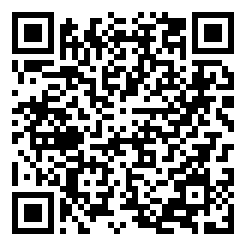
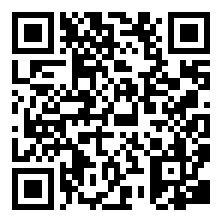
- Install the app on your phone FireSAFE from the App Store (for iOS) or Google Play (for Android), or download it by scanning one of the QR codes above.
- Connect the Hub to the power supply.
- Connect the Hub to the internet – with an Ethernet cable (not included in the package) or via a Wi-Fi network.
- Launch the app and carry out its basic setup.
- In the FireSAFE app, tap the button (+) to add a device, scan the QR code located on the back of the Hub and enter the information required by the setup wizard in the app.
- Confirm that the Hub has been added successfully in the FireSAFE app.
- Tap the button Save.
- Tap the assigned Hub to display information on network status, device status, signal strength, subordinate devices, alarm status and other information.
After a successful connection, the blue COMMUNICATION LED indicator lights up. The app then returns to the page for the device name and room configuration.
You can customise, rename and edit the names of the added devices and arrange the devices into the room where they are to be located.
Adding devices to the Hub
Alarms, detectors and other FireSAFE elements are added to the Hub by pairing from the FireSAFE app – by selecting Add device and then scanning the QR code on the bottom or rear label of the device, or by entering it manually. Switch the Hub to pairing mode by pressing three times the PAIRING button; pairing mode is indicated by a quickly flashing green LED indicator (once every 0.5 seconds). Press the PAIRING button once to end pairing mode.
Unpairing all devices
To unpair all connected devices from the Hub, press the PAIRING button four times and on the fifth press hold it for 3 seconds. All LED indicators light up, the Hub and the other devices beep and the Hub goes offline for 2 minutes. All FireSAFE devices are unpaired, except for camera devices.
States and signalling
The Hub indicates its status visually with four LED indicators and acoustically with a built-in speaker with a volume of up to 70 dB at a distance of 3 m.
| Status / mode | Signalling |
|---|---|
| Standby mode | The green LED indicator is continuously lit. |
| Pairing | The green LED indicator flashes rapidly (once every 0.5 seconds). |
| Removing wireless devices | All indicators stay lit continuously for 3 seconds. |
| Alarm | The red ALARM LED indicator is lit continuously. |
| Fault | The yellow FAULT LED indicator is lit continuously. |
| Successfully connected to the network (online) | The blue COMMUNICATION LED indicator is lit continuously. |
| Access point (AP) mode | The blue COMMUNICATION LED indicator flashes quickly (once every 0.5 seconds). |
| Restoring factory settings | The red LED indicator flashes rapidly (once every 0.5 seconds). |
Voice warning messages
The SAFE 50HUB-WRF Hub has a voice warning message system. In the event of danger, a fault or important changes in the network or system, the Hub informs the user of the current situation through various types of voice messages in the form of a human voice. The language of the voice warning messages is selectable and can be changed in the menu of the FireSAFE mobile app.
List of available voice warning messages
- Warning! Smoke has been detected!
- Warning! An abnormal temperature has been detected!
- Warning! Carbon monoxide has been detected!
- Warning! The smoke alarm has a fault.
- Warning! The heat alarm has a fault.
- Warning! The carbon monoxide alarm has a fault.
- Warning! The smoke alarm has low batteries.
- Warning! The heat alarm has low batteries.
- Warning! The carbon monoxide alarm has low batteries.
- Warning! The carbon monoxide alarm has reached the end of its life.
- Wi-Fi connection established successfully.
- Wi-Fi connection failed.
- The device is connected to the cloud.
- Connection to the cloud failed.
- Warning! The device has detected an alarm!
- Warning! A device is reporting a fault.
- Warning! A device is reporting low batteries.
- Warning! A device is reporting end of life.
Reset and troubleshooting
If the Hub indicates fault mode (the yellow FAULT LED indicator is lit), proceed as follows:
- Restart the Hub – disconnect it from the power supply and connect it again.
- If the problem persists, perform a reset – restore the Hub to the default factory settings. Insert a small object (for example, the end of a paper clip) into the Reset button opening and hold the button for 3 seconds. The restore process is indicated by the rapidly flashing red LED indicator.
- If these steps have not helped, contact our technical support.
If the device is damaged or faulty, do not attempt any repairs yourself – contact your seller or our technical support.
Choosing the installation location
The Hub is intended for indoor use. Before the actual installation, choose a suitable installation location with an accessible connection to a power supply and to the Ethernet network, and verify that the Hub has a stable signal strength for all connected devices.
Where not to install the Hub
- Near metal objects and structures that may weaken or block the radio signal.
- In places prone to vibration and shocks.
- In places exposed to direct sunlight, extreme cold, damp or sudden changes in temperature.
- In damp, dusty or smoky spaces and in poorly ventilated places.
- Outdoors – the Hub is intended for indoor installation only.
Installing the Hub
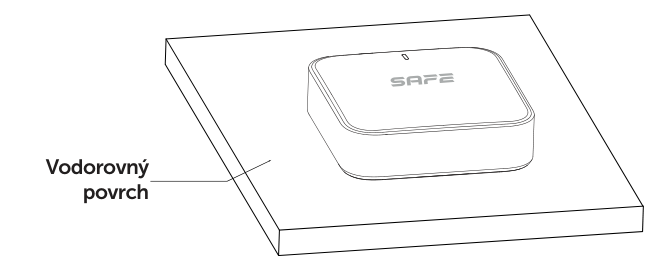
The Hub's housing was designed so that it can be installed by simply placing it in the optimal position on a horizontal surface, or fixed to a wall with the supplied mounting material.
Wall mounting
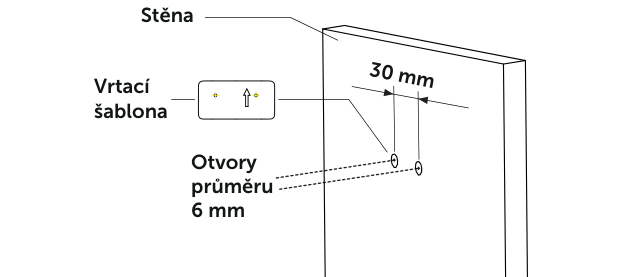
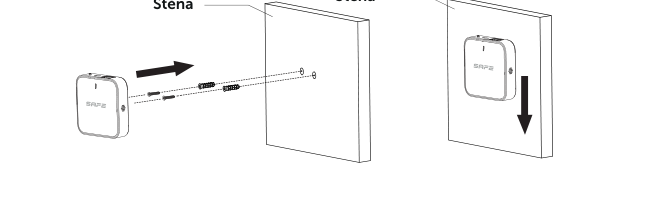
- At the installation location, use the supplied drilling template to mark and then drill holes with a diameter of 6 mm at a distance of 30 mm from each other. Insert wall plugs into the prepared holes.
- Insert self-tapping screws into the wall plugs and tighten them so that you leave a gap of approximately 5 mm.
- Place the Hub with its back onto the heads of the self-tapping screws and slide it downwards so that the screw heads fit well into the locking position of the openings in the mounting embossments.
Free-standing installation on a horizontal surface
The Hub's housing design also offers the option of simply placing it on a horizontal surface. After placing it, make sure the device is stable.
Maintenance
To keep the device in good working order, follow the instructions and recommendations below:
- Do not place the Hub in places prone to vibration and shocks – they may damage it.
- Do not disassemble the Hub or interfere in any way with the device's internal electrical circuits. Any such attempt will result in loss of the warranty.
- Keep the Hub clean and protect it from moisture, dust and excessive temperature.
- Do not cover the Hub's ventilation openings and do not place any objects on it.
- If the Hub indicates fault mode, follow the chapter Reset and troubleshooting.
- Keep the Hub firmware up to date – updates are downloaded remotely from the cloud.
- If the device is damaged or defective, do not attempt any repairs yourself and contact your retailer.
Technical specifications
| Model designation | |
| SAFE 50HUB-WRF | FireSAFE wireless Hub, white version |
| Order code | 50HUB-WRF |
| Classification | Hub with radio communication and video verification support |
| Capacity and interfaces | |
| Maximum number of linked devices | 24 units of the FireSAFE type |
| IP camera support | Yes (only cameras compatible with the FireSAFE app) |
| Network modes | Ethernet, Wi-Fi |
| Network port | 1× RJ-45, 10 Mb/s / 100 Mb/s |
| Audio output | 1 channel |
| Mobile app | FireSAFE – iOS 9.1 and higher; Android 4.4 and higher |
| Language localisation | Czech, Slovak, Polish, English, German |
| Functions | |
| LED indication | 1× power LED indicator, 1× COMMUNICATION LED indicator, 1× FAULT LED indicator, 1× ALARM LED indicator |
| Buttons | 1× PAIRING button, 1× Reset button |
| Built-in siren | ≤ 70 dB at a distance of 3 m |
| Signalling | Acoustic (siren up to 70 dB) and visual (LED indication) |
| Voice warning message system | Yes, language selectable in the app |
| Remote update | Yes (cloud) |
| Wireless transmission – CONNECTED | |
| Operating radio frequency | 868.0–868.6 MHz |
| Transmitter power (EIRP) | limit 25 mW |
| Communication type | Two-way |
| Communication range | Up to 1,000 m in open space |
| Data integrity check | CRC8 |
| Encryption mode | TLS for communication with the cloud |
| Frequency hopping | Yes (automatic) |
| Wi-Fi | |
| Wireless protocol | IEEE 802.11b/g/n |
| Wi-Fi frequency | 2.4 GHz (not compatible with 5 GHz Wi-Fi networks) |
| Wi-Fi frequency range | 2400–2483.5 MHz |
| Wi-Fi transmission range | 50 m |
| General | |
| Power supply | Input: 100–240 V AC, 50/60 Hz; power adapter output: 5.0 V DC / 1.0 A |
| Power cable length | 1 m |
| Backup battery | Ne |
| Operating temperature | −10 °C to +55 °C |
| Operating humidity | Up to 95 % relative humidity, non-condensing |
| Storage conditions | Temperature: −10 °C to +55 °C; humidity: 10 % to 95 % relative humidity, non-condensing |
| Housing material | PC + ABS |
| Colour | White |
| Type of installation | Indoor |
| Mounting method | On a wall or on a horizontal surface (mounting material is included in the package) |
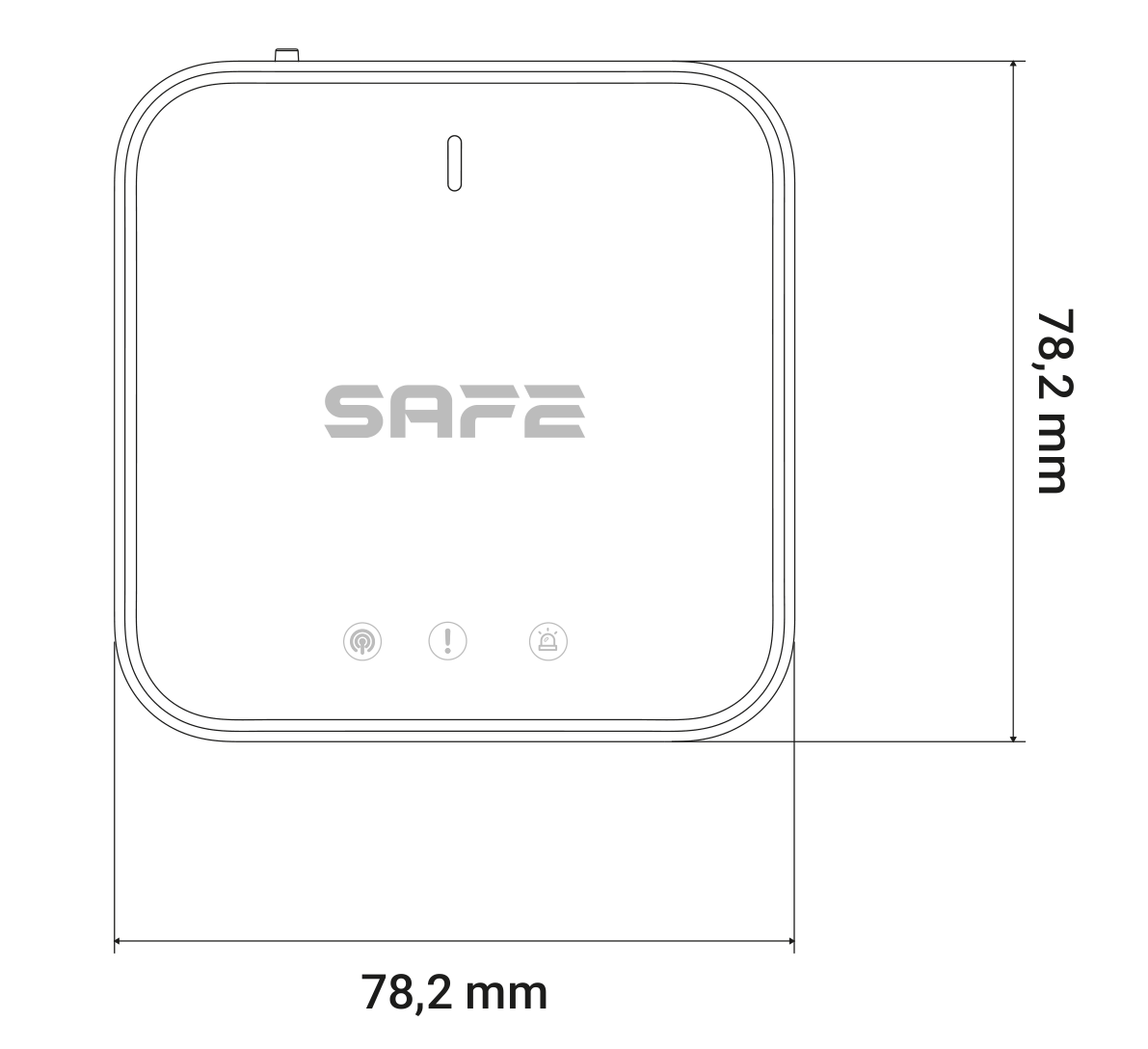
| Product dimensions | 78.2 × 78.2 × 22.9 mm |
| Product weight | 60 g |
| Product packaging dimensions | 103 × 52 × 103 mm |
| Product packaging weight | 148,7 g |
| Carton dimensions | 475 × 329 × 278 mm |
| Carton weight | 6.9 kg |
| Number of pieces per carton | 40 pcs |
| Declaration of Conformity | CE; EN IEC 63000:2018; EN 62368-1:2014+A11:2017; EN IEC 62311:2020; EN 55032:2015+A1:2020; EN IEC 61000-3-2:2019+A2:2021; EN 61000-3-3:2013+A1:2019+A2:2021; EN 55035:2017+A11:2020; EN 50130-4:2011+A1:2014; ETSI EN 301 489-1 V2.2.3; ETSI EN 301 489-3 V2.3.2; ETSI EN 301 489-17 V3.2.4; ETSI EN 300 328 V2.2.2; ETSI EN 300 220-1 V3.1.1; ETSI EN 300 220-2 V3.2.1 |
| EAN code | 0703123018258 |
| Warranty | 24 months |
Package contents
Check the package contents against the following checklist. If you find that the device is damaged or the contents are incomplete, contact your seller.
- Hub SAFE 50HUB-WRF – 1 pc
- Power adapter – 1 pc
- Power cable – 1 pc
- Drilling template – 1 pc
- Self-tapping screws – 2 pcs
- Wall plugs – 2 pcs
- User manual – 1 pc
Safety notices
- Before use, check that the power supply is correct, and operate the Hub only within the rated range of the power input.
- Transport, use and store the Hub only within the permitted temperature and humidity range.
- Do not allow liquids to drip or splash onto the Hub, and do not place any objects containing liquid on it.
- Do not insert any objects into the ventilation openings of the product and do not cover the product.
- Strictly follow local electrical safety regulations and standards. The supply voltage must be stable and meet the requirements given on the device's label.
- Do not place the Hub in a location exposed to direct sunlight or near heat sources; keep it away from moisture, dust and soot.
- Place the Hub in a well-ventilated place and do not block its ventilation.
- Use only the power adapter and cable supplied by the manufacturer. Do not disconnect the power cable from the Hub while the adapter is plugged into the mains.
- Connect Class I electrical appliances to a socket with protective earthing.
- Do not disassemble the Hub and do not carry out any repairs on it yourself.
- The Hub is only a part of the fire safety system and does not replace the operator's fire protection obligations.
Disposal
Do not dispose of electrical appliances as unsorted municipal waste; use separate waste collection points. For current information on collection points, contact your local authorities. If electrical appliances are deposited in landfills, hazardous substances can leach into groundwater and enter the food chain, damaging your health.
Warranty
A warranty is provided for the SAFE 50HUB-WRF Hub 24 months from the date of sale.
- The manufacturer guarantees that, under normal use and operation, the device will be free from any defects in material and workmanship for a period of two years from the date of sale. The manufacturer's obligation under this warranty is limited to the repair or replacement of the device, or any part of it, in which a defect in material or workmanship is found, free of charge after it is sent, together with proof of the date of purchase and with postage prepaid, to the address of the service centre: SAFE HOME europe s.r.o., Čechova 1005/4, 750 02 Přerov, Czech Republic.
- This warranty becomes void if the product has been damaged, altered, misused or modified after purchase, or if it has stopped working as a result of poor maintenance or incorrect placement.
- Any implied warranties arising from this sale, including but not limited to implied warranties relating to description, merchantability and fitness for a particular purpose, are limited to the duration of this warranty.
- Under no circumstances shall the manufacturer or any of its parent or subsidiary companies, sales representatives or distributors be liable for loss of functionality of this product or for any indirect, special, incidental or consequential damage, or for costs or expenses incurred by the consumer or any other user of this product, whether on the grounds of breach of contract, negligence, strict liability in tort or otherwise.
- Neither the manufacturer nor any of its parent or subsidiary companies, sales representatives or distributors shall be liable for any injury to persons, damage to property or other special, collateral, incidental or consequential damage that may arise as a result of a gas leak, fire or explosion.
- This warranty does not affect your statutory rights.
Documents
- A declaration of conformity has been issued for the product.
- The individual declarations, the user manual and other documents for the product can be found at www.smart-safe.eu.
- Service centre: SAFE HOME europe s.r.o., Čechova 1005/4, 750 02 Přerov, Czech Republic.
Need help?
SAFE HOME europe technical support:
E-mail: info@safe-home.eu · Telephone: (+420) 581 222 262
Web: www.smart-safe.eu