
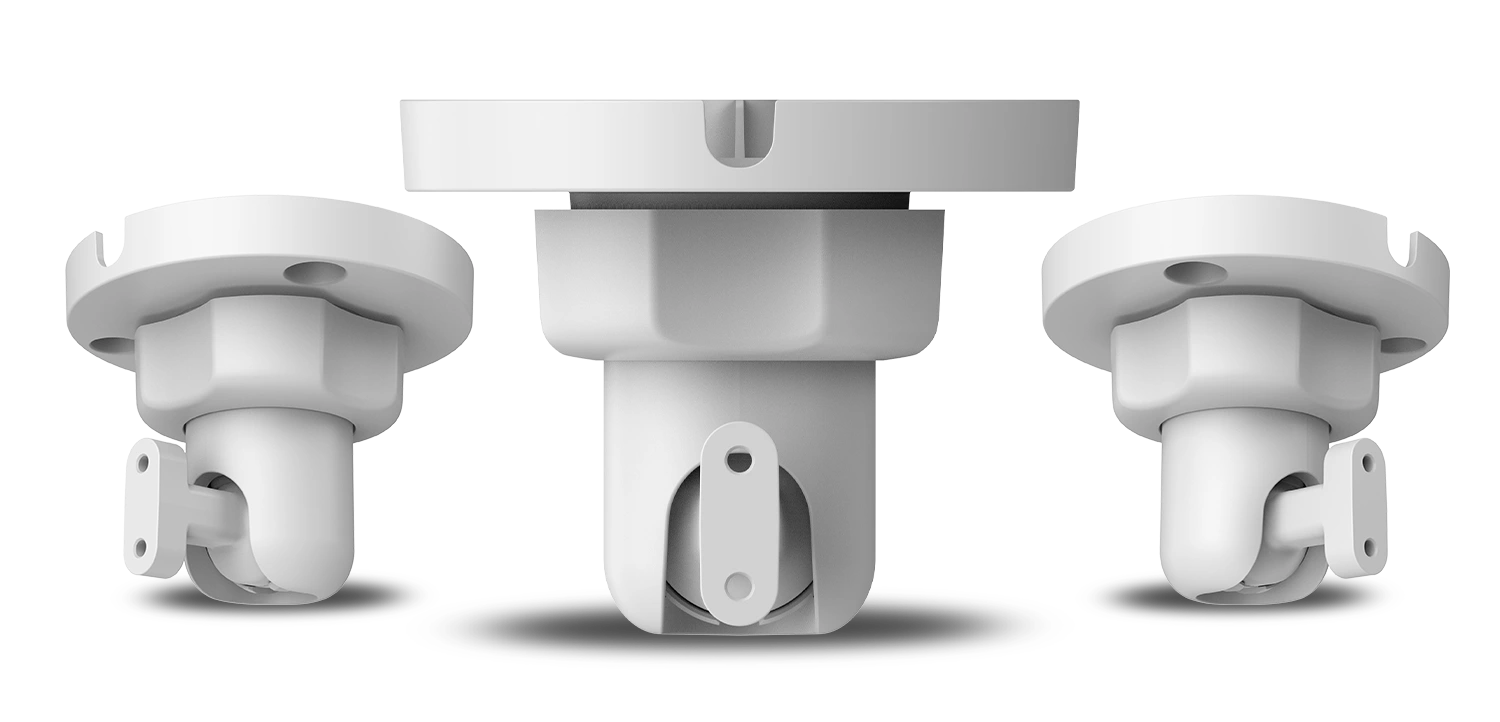
Bracket Cam SAFE 11020 is a professional adjustable mounting bracket designed for photo-verification PIR detectors in the Motion Cam series. Its robust construction, combined with exceptional adjustment flexibility, makes it an indispensable accessory for any integrator of a modern SAFE wireless security system.
Preface
General
This user manual describes the installation, features, and operation of the swivel mount for Motion Cam detectors (hereinafter referred to as the “bracket”). Before using the device, please read the manual carefully and keep it for future reference.
Safety Instructions
The following signal words may appear in the user manual:
| Signal Word | Meaning |
|---|---|
| DANGER | Indicates a high potential hazard that, if not avoided, may result in death or serious injury. |
| WARNING | Indicates a medium or low potential hazard that could cause minor or moderate injury if not avoided. |
| CAUTION | Indicates a potential risk that could lead to property damage, data loss, reduced performance, or an unpredictable outcome. |
| TIP | Provides methods to help you solve a problem or save time. |
| NOTE | Provides additional information, such as emphasis and supplementary text. |
Revision History
| Version | Revision Content | Release Date |
|---|---|---|
| V1.0.0 | First release. | August 2026 |
Privacy Notice
As a device user or data controller, you may collect personal data of others, such as their face, fingerprints, and license plate number. You must comply with local privacy laws and regulations to protect the legitimate rights and interests of other people by implementing measures that include, among others: providing clear and visible identification to inform people of the existence of the monitored area and providing the required contact information.
About the Manual
- The user manual serves as a reference guide only. There may be minor differences between the information provided and the product.
- We are not liable for any damage resulting from using the product in a manner that does not comply with the instructions in the user manual.
- The manual will be updated according to the latest laws and regulations of the relevant jurisdictions. For detailed information, refer to the printed user manual, scan the QR code, or visit our official website. The manual is for reference purposes only. There may be minor differences between the electronic and paper versions.
- All designs and software are subject to change without prior written notice. Due to product updates, certain differences may occur between the product and the information in the manual. Customer service will provide you with the latest version of the software and supplementary documentation.
- There may be printing errors or discrepancies in the description of functions, operations, and technical data. In the event of doubt or dispute, we reserve the right of final explanation. If the manual (in PDF format) cannot be opened, update your reader software or try a different common reader software.
- All trademarks, registered trademarks, and company names in the manual are the property of their respective owners.
- If you encounter any problems while using the device, visit our website or contact your supplier or customer service.
- In the event of ambiguity or dispute, we reserve the right of final explanation.
Important Safeguards and Warnings
This section contains information on the proper handling of the product, risk prevention, and prevention of property damage. Read it carefully before using the device and follow the instructions provided when using it.
Installation Requirements
- When working at heights, follow all safety procedures and use the required protective equipment.
- Before drilling, make sure there is no electrical wiring, water piping, or gas piping at the installation site.
- Install the bracket on a load-bearing surface and use fasteners appropriate to the type of surface.
Compatibility
The Bracket Cam SAFE 11020 was developed for the flexible installation of photo-verification PIR motion detectors SAFE Motion Cam and supports both wall and ceiling mounting. The polycarbonate and aluminum alloy body offers an ideal balance between mechanical strength and low weight. The joint mechanism enables smooth and precise aiming of the detector in both the horizontal and vertical planes, which significantly simplifies installation and subsequent fine-tuning of the detection angle.
The bracket is fully compatible with the following detectors:
- SAFE 38450 – Motion Cam
- SAFE 38451 – Motion Cam
Basic anti-corrosion treatment, together with an operating temperature range from −10 °C to +55 °C, ensures reliable operation both in standard indoor spaces and in more demanding outdoor conditions.
Package Contents
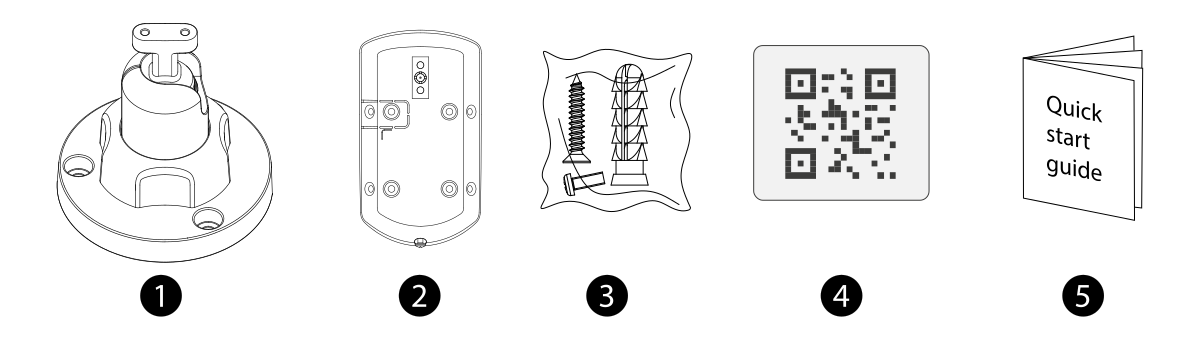
- Bracket base (wall/ceiling) – 1 pcs
- Articulated swivel arm with detector adapter – 1 pcs
- Mounting screws and wall plugs – 1 set
- QR code linking to this manual – 1 pcs
- Quick user guide – 1 pcs
Installation
The bracket can be mounted on a vertical wall or a horizontal ceiling. Before drilling, check that there is no electrical wiring or other installations inside the wall or ceiling, and choose a location so that the detector covers the desired area after installation.
Wall Mounting
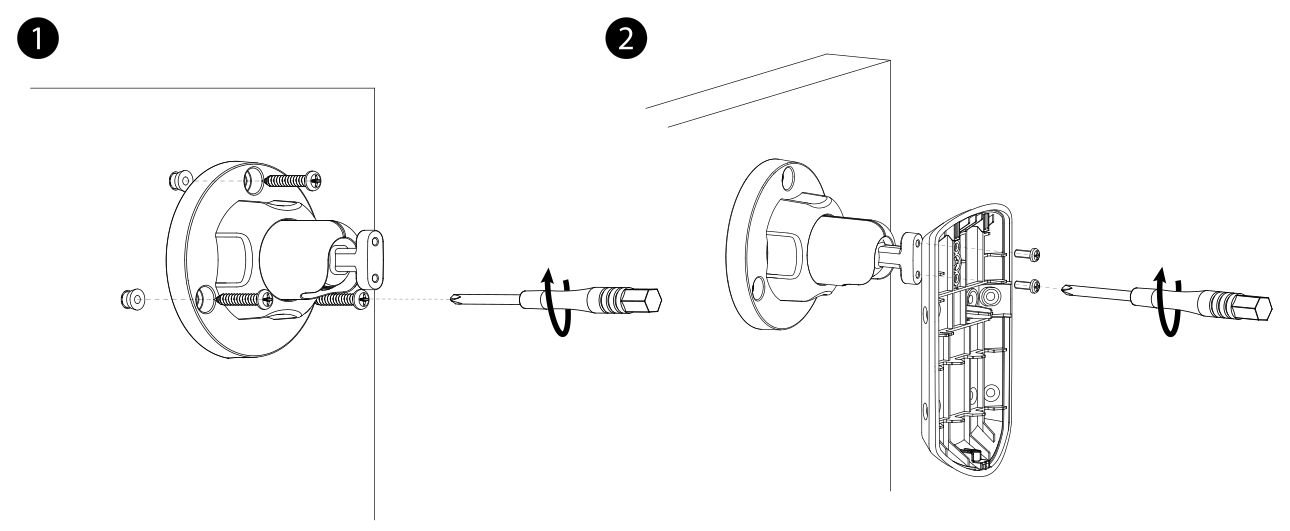
- Hold the bracket base at the chosen location on the wall and mark the positions of the holes to be drilled through the mounting holes.
- Drill the holes and insert the included wall plugs.
- Screw the bracket base to the wall using the included screws.
- Attach the Motion Cam detector to the swivel arm and secure it with the included screw.
- Set the desired rotation angle of the detector (see below).
Ceiling Mounting
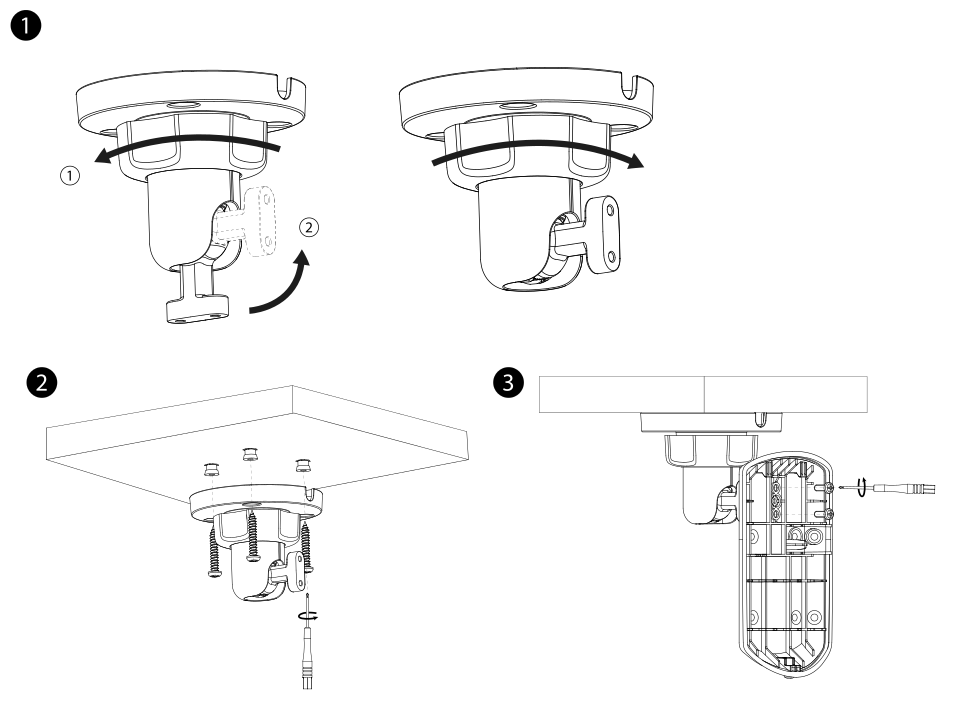
- Rotate the swivel arm from the base into the position intended for ceiling mounting (see figure).
- Hold the bracket base at the chosen location on the ceiling and mark the positions of the holes to be drilled through the mounting holes.
- Drill the holes and insert the included wall plugs.
- Screw the bracket base to the ceiling using the included screws.
- Attach the Motion Cam detector to the swivel arm and secure it with the included screw.
- Set the desired rotation angle of the detector (see below).
Adjusting the Rotation Angle
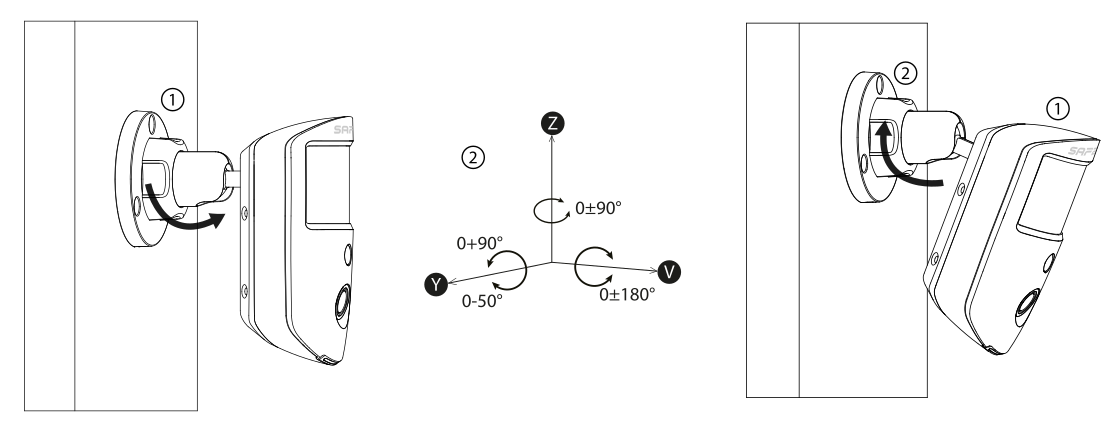
After loosening and retightening the screw, the joint mechanism allows the detection direction to be smoothly adjusted in both planes:
| Mounting Type | Horizontal rotation (H) | Vertical tilt (V) |
|---|---|---|
| Wall | ±90° | −50° to +90° |
| Ceiling | ±180° | 0° to −90° |
After setting the angle, secure the detector and perform a detection test according to the Motion Cam detector manual to verify that the selected angle covers the desired area.
Technical Specifications
| General | |
| Model Designation | SAFE 11020 |
| Classification | SAFE swivel mount for indoor motion detectors with Cam photo-verification |
| Compatibility | SAFE 38450, SAFE 38451 |
| Application | Indoor / Outdoor |
| Installation type | Wall / ceiling |
| EAN code | 0728204235065 |
| Construction | |
| Material | Polycarbonate and aluminum alloy |
| Color | White |
| Anti-corrosion level | Yes (basic protection) |
| Joint | Yes |
| Rotation angle | Wall mounting: ±90° horizontally, −50° to +90° vertically Ceiling mounting: ±180° horizontally, 0° to −90° vertically |
| Dimensions and Weight | |
| Product dimensions | φ 70.0 × 55.1 mm |
| Package dimensions | 127 × 88 × 79 mm |
| Weight (net) | 45 g |
| Weight (gross) | 120 g |
| Operating Conditions | |
| Operating temperature | −10 °C to +55 °C |
| Operating humidity | 10–90 % RH |
| Tightening torque of the mounting screw | max. 0.5 N·m |
| Compliance and Warranty | |
| Compliance | CE |
| Warranty | 36 months |
Safety Notices
- Read this manual carefully before installation and keep it for future reference.
- Install the bracket on a solid, load-bearing surface capable of reliably supporting the weight of the detector together with the mounting accessories.
- Before drilling, check that there is no hidden electrical wiring, water piping, or other installations at the installation site.
- Tighten the screw securing the detector only to the recommended torque (max. 0.5 N·m) – overtightening may damage the detector cover.
- Do not disassemble or modify the bracket – if damaged, contact support.
- Do not dispose of the product with ordinary household waste – take it for recycling in accordance with local regulations.
Warranty
The SAFE Bracket Cam (SAFE 11020) is covered by a warranty of 36 months from the date of sale. The warranty does not cover defects caused by improper installation, mechanical damage, or failure to follow the instructions in this manual.
If you experience any problems with the device, contact technical support first – most situations can be resolved remotely.
Need Help?
SAFE HOME europe technical support:
Email: info@safe-home.eu · Phone: (+420) 581 222 262
Website: www.smart-safe.eu