
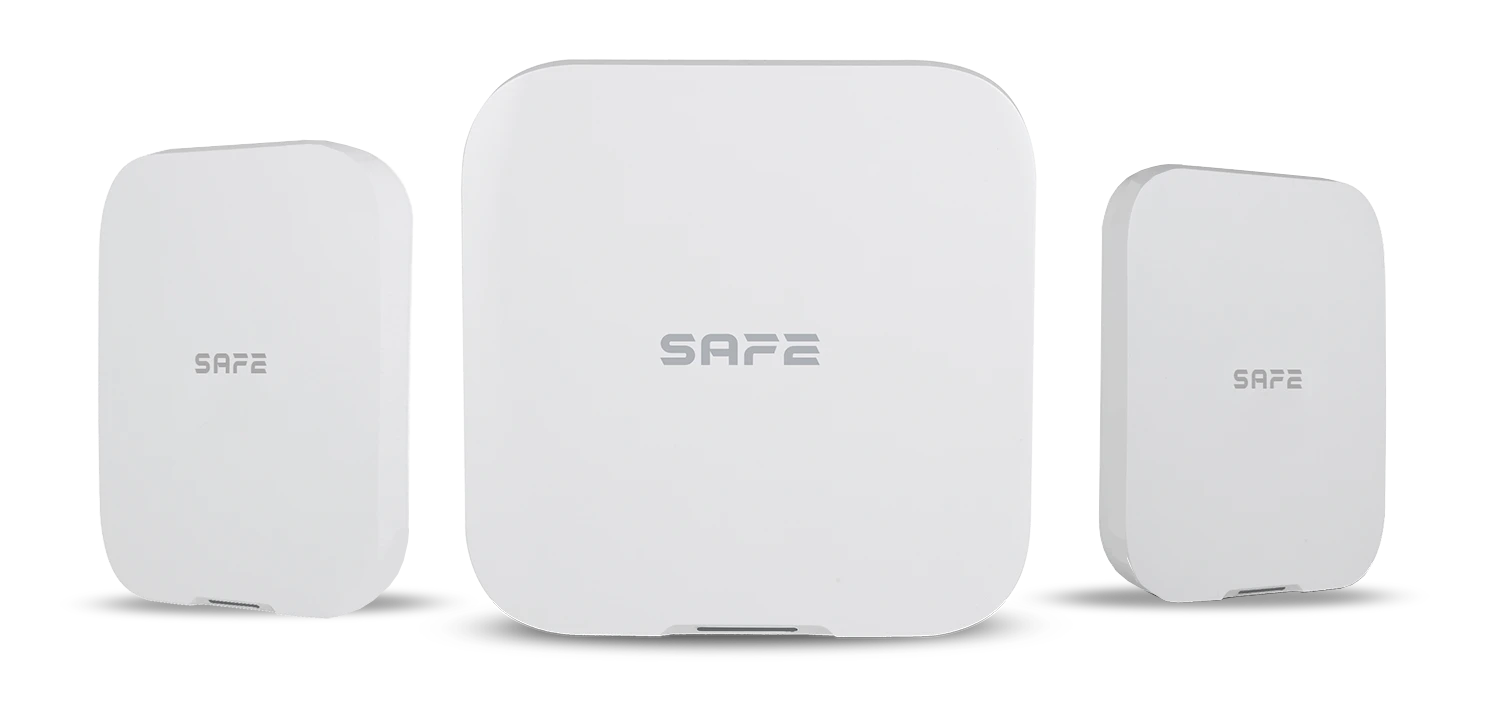
SAFE Rep is a smart radio signal repeater for the SAFE security system. Thick concrete walls, large spaces, or a complicated building layout can all significantly weaken the reliability of wireless communication. The repeater extends the range of the encrypted protocol SAFE Keeper and allows connecting up to 128 wireless devices, significantly expanding the coverage and capacity of your system. It is powered from the 230 V mains, and in the event of a power outage it is equipped with a backup battery.
Preface
General
This user manual introduces the installation, functions, and operation of the wireless signal repeater (hereinafter referred to as the "repeater"). Before using the device, please read this manual carefully and keep it for future reference.
Safety Instructions
The following signal words may appear in the user manual:
| Signal Word | Meaning |
|---|---|
| DANGER | Indicates a high potential hazard that, if not avoided, may result in death or serious injury. |
| WARNING | Indicates a medium or low potential hazard that could cause minor or moderate injury if not avoided. |
| CAUTION | Indicates a potential risk that could lead to property damage, data loss, reduced performance, or an unpredictable outcome. |
| TIP | Provides methods to help you solve a problem or save time. |
| NOTE | Provides additional information, such as emphasis and supplementary text. |
Revision History
| Version | Revision Content | Release Date |
|---|---|---|
| V1.0.0 | First release. | August 2026 |
Privacy Notice
As a device user or data controller, you may collect personal data of others, such as their face, fingerprints, and license plate number. You must comply with local privacy laws and regulations to protect the legitimate rights and interests of other people by implementing measures that include, among others: providing clear and visible identification to inform people of the existence of the monitored area and providing the required contact information.
About the Manual
- The user manual serves as a reference guide only. There may be minor differences between the information provided and the product.
- We are not liable for any damage resulting from using the product in a manner that does not comply with the instructions in the user manual.
- The manual will be updated according to the latest laws and regulations of the relevant jurisdictions. For detailed information, refer to the printed user manual, scan the QR code, or visit our official website. The manual is for reference purposes only. There may be minor differences between the electronic and paper versions.
- All designs and software are subject to change without prior written notice. Due to product updates, certain differences may occur between the product and the information in the manual. Customer service will provide you with the latest version of the software and supplementary documentation.
- There may be printing errors or discrepancies in the description of functions, operations, and technical data. In the event of doubt or dispute, we reserve the right of final explanation. If the manual (in PDF format) cannot be opened, update your reader software or try a different common reader software.
- All trademarks, registered trademarks, and company names in the manual are the property of their respective owners.
- If you encounter any problems while using the device, visit our website or contact your supplier or customer service.
- In the event of ambiguity or dispute, we reserve the right of final explanation.
Important Safeguards and Warnings
This section contains information on the proper handling of the product, risk prevention, and prevention of property damage. Read it carefully before using the device and follow the instructions provided when using it.
Operating Requirements
- Before use, make sure the device's power supply is working properly.
- Do not unplug the device's power cable while it is switched on.
- Use the device only within its rated power range.
- Transport, use, and store the device within the permitted humidity and temperature conditions.
- Prevent liquids from splashing or dripping onto the device. Make sure there are no liquid-filled objects on the device, to prevent liquid from entering it.
- Do not disassemble the device.
Installation Requirements
- Before switching on, connect the device to the power adapter.
- Strictly comply with local electrical safety standards and make sure the voltage in the area is stable and matches the device's power requirements.
- Do not connect the device to more than one power source. Otherwise, the device could be damaged.
- When working at heights, follow all safety procedures and use the required protective equipment.
- Do not expose the device to direct sunlight or heat sources.
- Do not install the device in damp, dusty, or smoky locations.
- Install the device in a well-ventilated location and do not block its ventilation.
- Use the power adapter or power supply provided by the device manufacturer.
- The power supply must meet the ES1 requirements of IEC 62368-1 and must not exceed PS2. The power supply requirements are governed by the device's rating label.
- Connect Class I electrical appliances to a socket with protective earthing.
Functional Elements
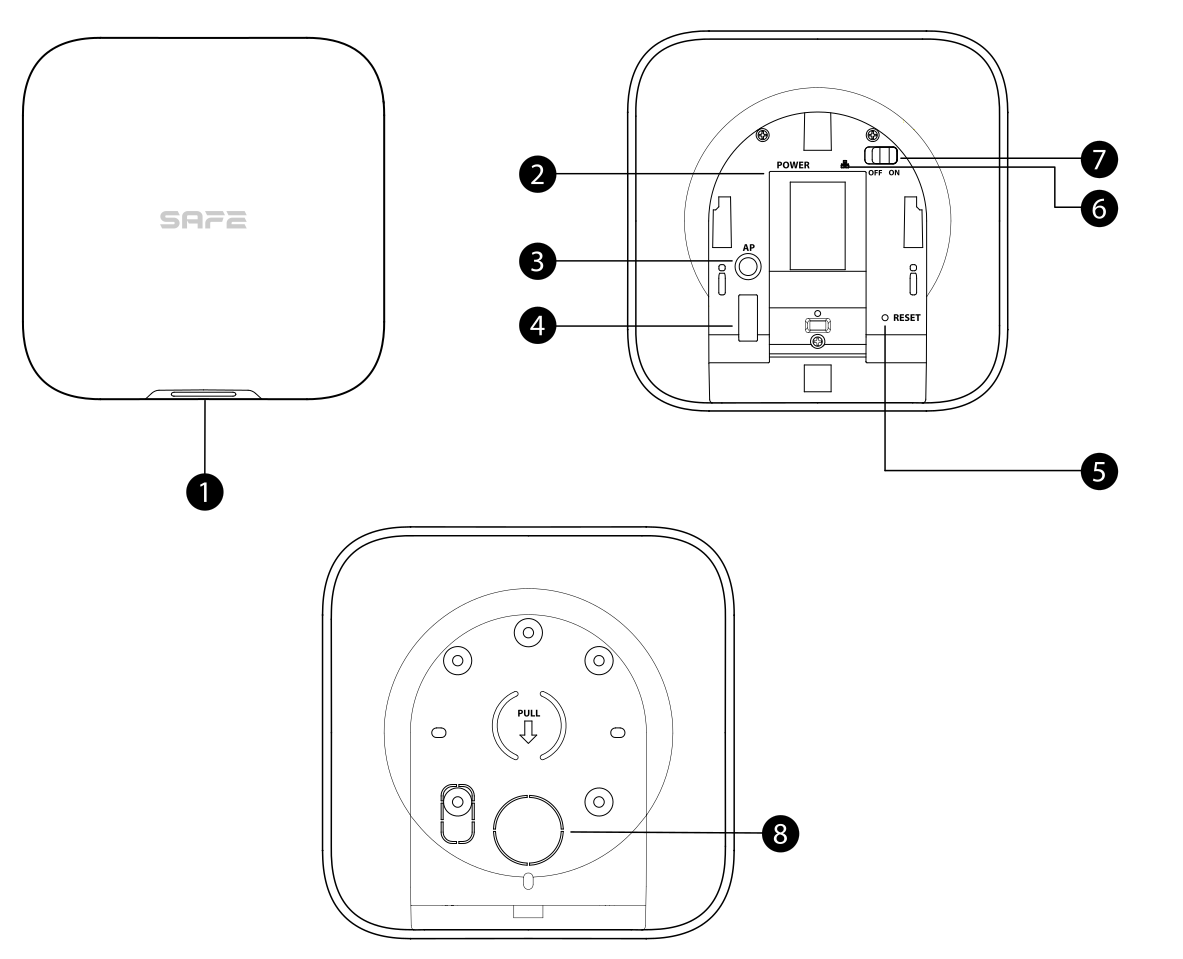
- LED indicator – indicates pairing, operating status, and faults (see Signaling).
- Power connector – connect the power cable to the mains.
- AP button – hold for 2 seconds to enable Wi-Fi access point mode for configuring the connection from your phone; hold again for 2 seconds to disable AP mode.
- Tamper contact – triggers an alarm when the repeater is removed from the mounting plate.
- Reset button – hold for 10 seconds to restart the repeater and restore factory settings.
- Ethernet Connector – connect a network cable to the router.
- Power switch – turns the repeater on and off.
- Rear Cover / Mounting Plate – opening the cover triggers a tamper alarm.
Operating Principle
The SAFE Rep signal repeater extends the range of wireless communication between the hub and the peripherals of the SAFE system. It is placed between the hub and more distant or structurally shielded peripherals, acting as an intermediate link that receives the signal and retransmits it further. Up to 6 repeaters, allowing coverage of even large or complex premises.
Extending the Range of SAFE Keeper
Communication between the hub, the repeater, and the peripherals is provided by the encrypted bidirectional radio protocol SAFE Keeper in the 868 MHz with a range of up to 2 000 m in open space. The repeater supports connecting up to 128 wireless devices and transmission is secured with AES-128 encryption using a rolling code and frequency hopping as protection against interference.
Switching Devices to the Repeater
Each peripheral in the system communicates either directly with the hub or through the repeater – depending on which connection is better. The communication path can be set in two ways:
- Automatic Mode (default) – the peripheral automatically selects the path based on the signal strength between the hub and the repeater. If the repeater's signal is better than the signal directly from the hub, the peripheral automatically switches to communicating through the repeater.
- Manual Mode – the installer selects a specific peripheral from the list in the repeater settings and permanently assigns it to this repeater, regardless of the current signal strength.
Roaming of Key Fobs and Panic Buttons
Key fobs and panic buttons are not tied to one specific repeater. The device is added to the system once and then works within range of any repeater as well as the hub itself – when moving between their coverage areas, communication is handed over automatically, without user intervention and without having to reassign the device. A panic button therefore works across the entire area covered by the system, not only where it was added.
Power Supply and Heartbeat Signal
The repeater is powered from the 230 V mains and is equipped with a built-in backup battery in case of a power outage (see Power supply and backup battery). The hub and the repeater regularly exchange, with each other and with connected peripherals, a heartbeat signal – if the connection to the repeater or to a peripheral behind it is missing for an extended period, the system reports it as offline.
Three Communication Paths to the Hub
The repeater can be connected to the hub in three ways – via a wired Ethernet network, a wireless Wi-Fi network, or directly via the SAFE radio protocol Keeper (AirFly). The selected path is set when adding the repeater to the system (see Adding to the System) and can subsequently be changed in the repeater settings.
Adding to the System
Before Adding the Repeater
- Install the app ProSAFE and log in to your account.
- Make sure you have a compatible hub added in the app (Hub 2 Plus LTE, SAFE 38300) with a stable internet connection.
- The hub must be in the Disarmed state.
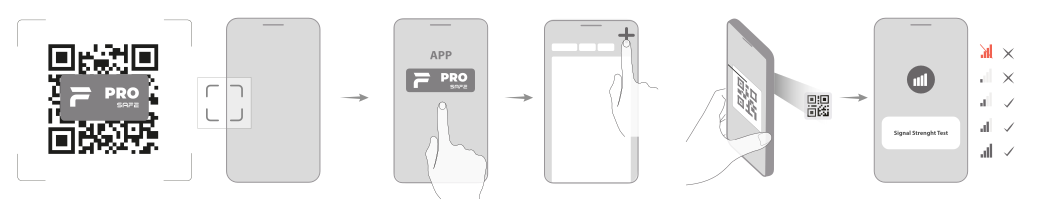
- Temporarily place the repeater at the intended installation location and perform a signal strength test – the recommended minimum value is 2 bars.

How to Add a Repeater – Radio Connection (AirFly)
- In the ProSAFE app, open your hub and click Device.
- Click + Add device.
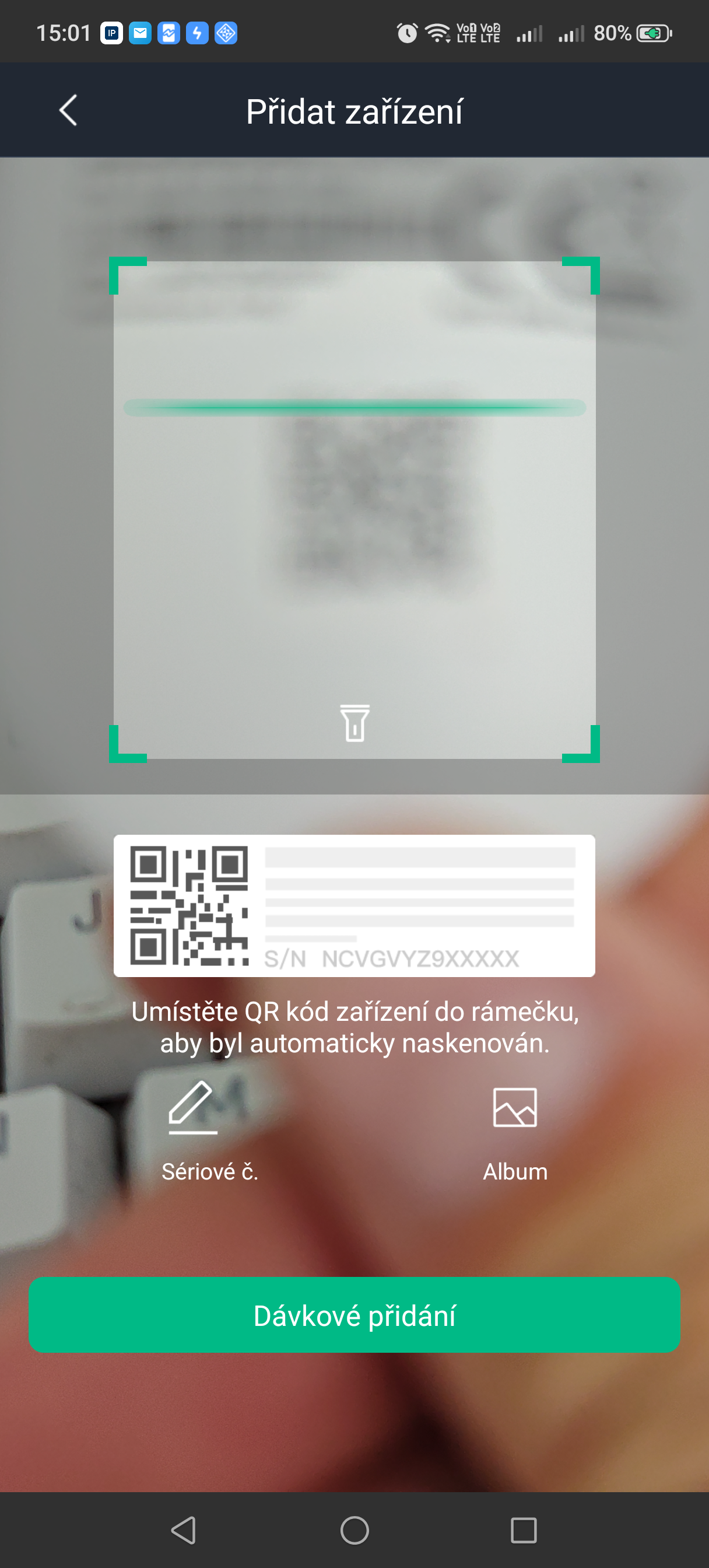
- Scan the QR code with the serial number on the bottom of the repeater, and tap Next.
- Once the repeater is found, tap Next.
- Enter a name for the repeater, select an area (zone), and tap Next.
- Following the on-screen instructions, switch the repeater's power switch from off to on – the LED indicator will start blinking green – and tap Next.
- Wait for pairing to complete and tap OK.
How to Add a Repeater – Wired Ethernet Network
- In the ProSAFE app, open your hub and click Device.
- Click + Add device.
- Connect an Ethernet cable to the repeater. The repeater and the hub must be on the same network.
- Scan the QR code with the serial number on the bottom of the repeater, and tap Next.
- In the top right corner, tap the menu ⋯, select Add via Network and click Next.
- Wait for pairing to complete and tap OK.
How to Add a Repeater – Wireless Wi-Fi Network
- In the ProSAFE app, open your hub and click Device.
- Click + Add device.
- Scan the QR code with the serial number on the bottom of the repeater, and tap Next.
- Enter and confirm the Wi-Fi network password and tap Next.
- Click Select Network Configuration Method and select Wi-Fi.
- Connect both the repeater and the hub to the same Wi-Fi network.
- Wait for pairing to complete and tap OK.
States
You can view the current status of the repeater in the ProSAFE app by selecting the repeater in the peripheral list.
| Parameter | Meaning |
|---|---|
| Device number | Sequence number of the repeater in the system |
| Online status | Connection between the repeater and the hub
|
| Signal strength | Radio signal level (SAFE Keeper) between the hub and the repeater: none / low / weak / good / excellent |
| RF-HD | Signal level on the dedicated channel for image data transmission between the hub and the repeater |
| Wi-Fi signal strength | Status of the repeater's internet connection via Wi-Fi; the recommended minimum value is 2 bars |
| Wi-Fi | Status of the repeater's Wi-Fi connection: Connected / Not Connected |
| External power supply | Mains power status: Connected / Not Connected – when disconnected, the repeater runs on the backup battery |
| Battery level | Remaining backup battery capacity in percent |
| Temporarily disable | Temporary bypass status, automatically restored after the system is disarmed
|
| Permanently Deactivate | Permanent deactivation status of the repeater – unlike temporary bypass, it is not automatically restored after the system is disarmed
|
| Tamper status | Open / Closed – indicates removal of the repeater from the mounting plate or opening of the cover |
| Firmware version | Current firmware version of the repeater |
Settings
You can adjust the settings in the ProSAFE app: select the repeater in the peripheral list and tap the edit icon.
| Settings | Value |
|---|---|
| Device name | Custom name for the repeater; displayed in the peripheral list and in notifications |
| Area (zone) | Assignment of the repeater to a system area |
| Temporarily disable | Yes / Cover Only / No Icon (Off) – the status is automatically restored after the system is disarmed |
| Permanently Deactivate | Yes / Cover Only / No Icon (Off) – unlike temporary bypass, the status is not automatically restored after the system is disarmed |
| LED indicator | On (default) / Off – when off, the LED does not light regardless of the repeater's status (alarm, fault, arming, disarming) |
| Switching Devices to the Repeater | Automatic Mode (default) – the peripheral selects the path based on signal strength / Manual Mode – use the "+" button next to the peripheral to permanently assign it to this repeater as its communication path |
| Network |
|
| Login Credentials | Display of the repeater's login name and password; the password can be changed, the username cannot be edited |
| Linkage on Connection Loss |
|
| AirFly Fault Detection | Automatic check of the functionality of the radio connection (AirFly) between the repeater and the hub |
| RF-HD Transmission Speed | High Speed – faster data transmission but limited range; cannot be enabled when the repeater is connected via Wi-Fi / Normal (default) – better wall penetration, slower transmission |
| RF-HD Test | Verification of the RF-HD signal strength and successful connection of the repeater to the hub; helps find the location with the strongest signal for installation |
| Signal strength test | Verification of the current signal strength to select a suitable installation location |
| Device Test | Verification of the functionality of a peripheral connected through this repeater |
| Transmission power | High / low / automatic – higher power extends the range and increases consumption
|
| Automatic Download | The update package is downloaded automatically after a new version is released |
| Firmware update | Display of the repeater's current firmware version and updating it to the latest version |
| User Manual | Display of the repeater's user manual |
Signaling
| LED indication | Event |
|---|---|
| Continuously lit green | The repeater is operating normally |
| Blinking Green | Pairing mode |
| Blinking Green Quickly | Transmit power is set to low (reduced-sensitivity mode) – blinks faster than in pairing mode |
| Solid Yellow | The repeater is offline |
| Flashes yellow | Repeater fault, for example a tamper alarm being triggered |
| Blinking Blue Slowly | The repeater is in access point (AP) mode. An uninitialized repeater that has not yet been connected to the hub is in this mode by default – the LED may not light up in this case |
Choosing the installation location
Place the repeater at a location along the path between the hub and more distant or structurally shielded peripherals so that it improves signal coverage in problem areas of the building. Both wall mounting and free-standing desktop placement are supported.
Signal strength
Before final mounting, temporarily place the repeater at the intended location, connect the power, and run a Signal strength test between the hub and the repeater. The recommended minimum value is 2 bars. If you use the RF-HD channel for image data transmission, also verify its strength using the RF-HD Test.
Where Not to Install the Repeater
- Near metal structures, distribution boards, or large appliances that shield the radio signal.
- In damp, dusty, or smoky areas.
- In places exposed to direct sunlight or near heat sources.
- In poorly ventilated areas, and do not otherwise block its ventilation.
- In locations with a weak signal between the hub and the planned location of the repeater.
Repeater Installation
The repeater can be mounted on a wall or placed freely on a desk (desktop). Before drilling, we recommend temporarily placing the repeater at the installation location, connecting the power, and performing a signal strength test.
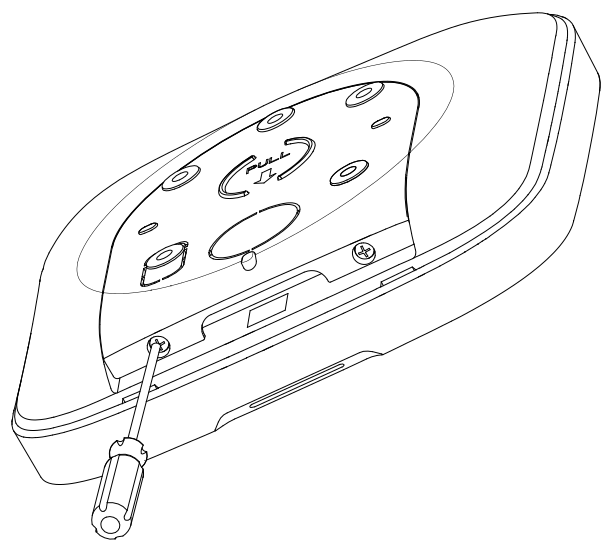
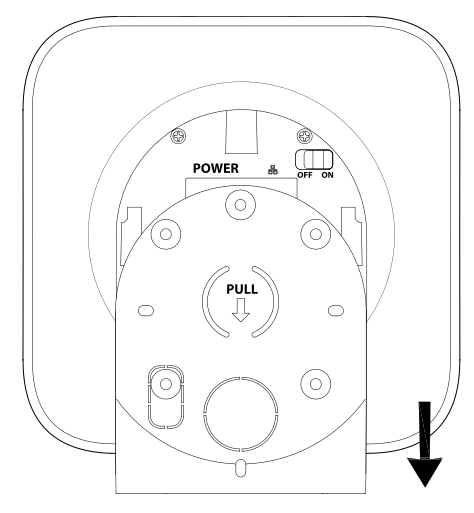
Opening the Cover and Preparing the Mounting Plate
- Loosen the screw at the bottom of the repeater and open it.
- Remove the mounting plate by sliding it in the direction of the arrow (PULL).
Connecting the Power Supply
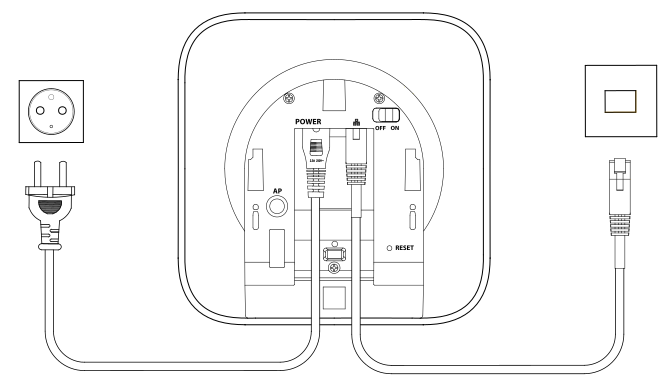
- Connect the power cable to a mains outlet and the other end to the repeater's power connector.
- If you want to connect the repeater via a wired network, connect an Ethernet cable to the Ethernet connector and the other end to the router.
- Use the power switch to turn the repeater to the ON position and add it to the system (see Adding to the System).
Wall Mounting
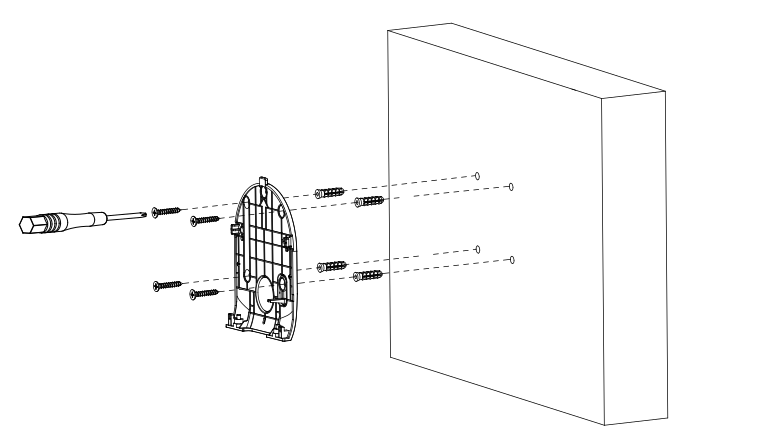
- Determine the position of the mounting holes, drill them into the wall, and insert the wall plugs (included in the package).
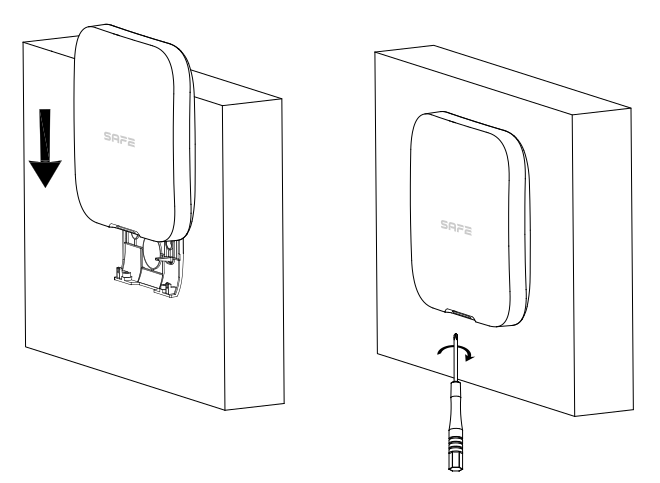
- Hold the mounting plate against the wall, align the holes with the wall plugs, and secure it with ST4×25 mm.
- Fit the repeater body onto the mounting plate from top to bottom and secure it with M3×8 mm countersunk-head screws at the bottom.
Functionality Test
After installation, verify that the repeater is functioning correctly:
- Signal strength test – in the app, run a test and verify that the signal between the hub and the repeater reaches at least 2 bars.
- RF-HD Test – for installations using image data transmission, also verify the strength of this channel.
- Device Test – for peripherals switched to the repeater, verify that they are communicating and sending messages to the hub.
- Check the Status External Power: Connected and the charge status of the backup battery in the repeater's status overview.
Power supply and backup battery
The repeater is powered from the 100–240 VAC, 50/60 Hz mains supply using the included power cable. In case of a mains power outage, it is equipped with a built-in rechargeable lithium battery, 3.7 V / 4750 mAh with a standby time of up to 35 hours (when connected to the hub only via the SAFE radio protocol Keeper), or up to 18 hours when connected via Ethernet, Wi-Fi, or the high-speed RF-HD channel.
- The battery charges to approximately 80 % capacity in 11 hours.
- The ProSAFE app will alert you to an insufficiently charged battery (Battery Level status).
- When mains power is disconnected, the app displays the status External Power: Not Connected and the repeater automatically switches to operating on the backup battery.
- The battery cannot be replaced by the user – it is the repeater's built-in battery.
Maintenance
- Keep the repeater clean and protect it from moisture, dust, and excessive temperature.
- Do not cover the repeater's ventilation openings and do not place any objects on it.
- Regularly check the signal strength between the hub and the repeater and the backup battery status in the ProSAFE app.
- After handling the repeater, perform a signal strength test again.
- Do not disassemble the repeater and protect it from corrosive and staining liquids.
- Keep the repeater's firmware up to date – use the automatic cloud update download function.
Technical Specifications
| Interface | |
| Wireless Elements | 128 wireless peripheral channels |
| Network Modes | Ethernet, Wi-Fi |
| Network port | 1× RJ-45, 10 Mbps / 100 Mbps |
| Function | |
| LED indicator | 1× multicolor (alarm, arming/disarming, cloud connection, fault, AP, pairing) |
| Buttons | Power button, Reset button, AP mode button |
| Remote update | Yes (cloud) |
| Tamper contact | Yes |
| Low battery detection | Yes |
| Pairing mode | Automatic / Manual |
| Wireless transmission – SAFE Keeper | |
| Carrier frequency | 868.0–868.6 MHz |
| Transmitter power (EIRP) | limit 25 mW |
| Communication type | Two-way |
| Communication distance | Up to 2,000 m in open space |
| Encryption | AES-128 |
| Frequency hopping | Yes (automatic) |
| Wi-Fi | |
| Wi-Fi Standard | IEEE 802.11b/g/n |
| Wi-Fi Frequency Range | 2400–2483.5 MHz |
| Wi-Fi Transmit Power | ≤ 20 dBm @ 2400–2483.5 MHz |
| General | |
| Power supply | 100–240 VAC, 50/60 Hz, 0.4 A |
| Backup battery | Lithium 3.7 V / 4750 mAh; standby time up to 35 h (SAFE Keeper) / 18 h (Ethernet, Wi-Fi, RF-HD); charges to 80% in approximately 11 h |
| Power consumption | 22 W (max.) |
| Operating temperature | With a charged battery: −10 °C to +50 °C; while charging the battery: 0 °C to +45 °C |
| Operating humidity | 10–90 % RH |
| Storage temperature | −10 °C to +55 °C |
| Storage humidity | 10–90 % RH |
| Housing material | PC + ABS, white |
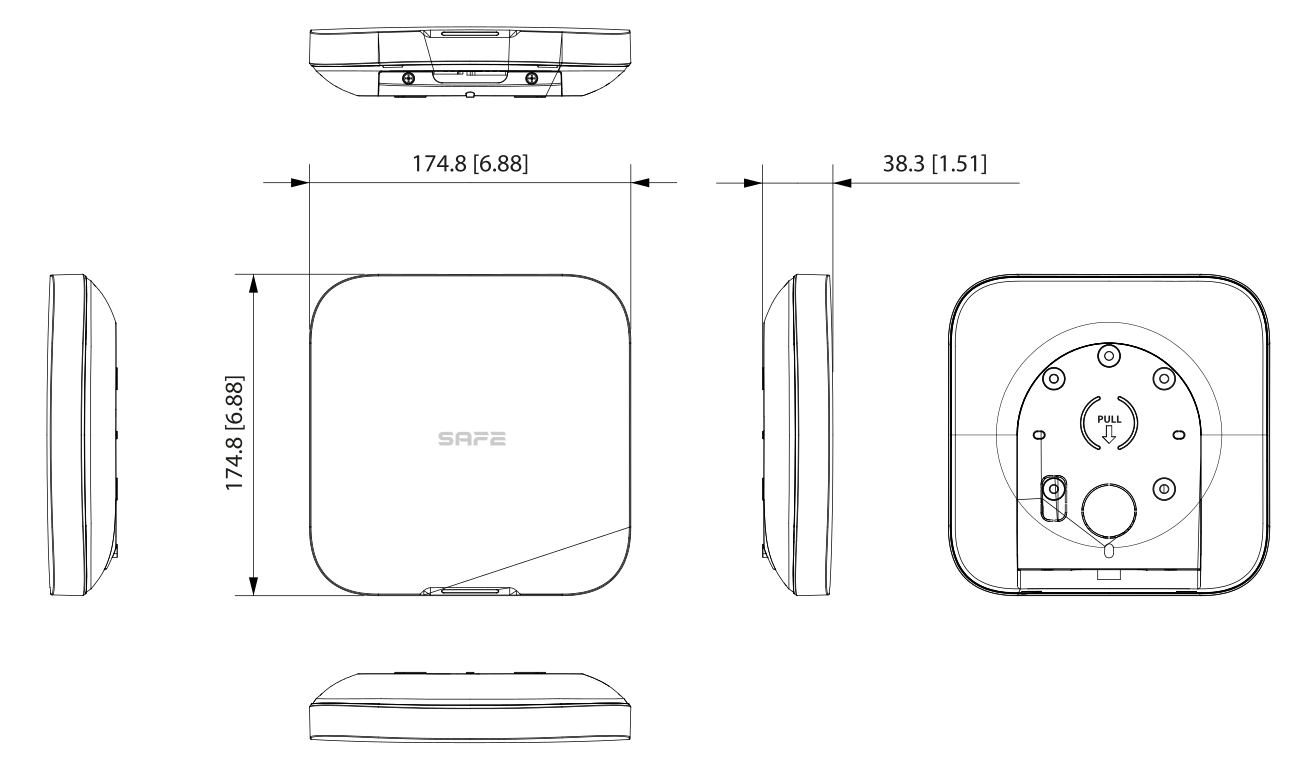
| Dimensions | 174.8 × 174.8 × 38.3 mm |
| Weight | 510 g |
| Installation | Wall-mounted, or freestanding on a desk (desktop) |
| Compatibility | Hub 2 Plus LTE (SAFE 38300) |
| Certification | CE; EN 50131-1; EN 50131-3; EN 50131-5-3; EN 50131-6; EN 50131-10; EN 50136-2; Security Grade 2; Environmental Class II |
Package Contents
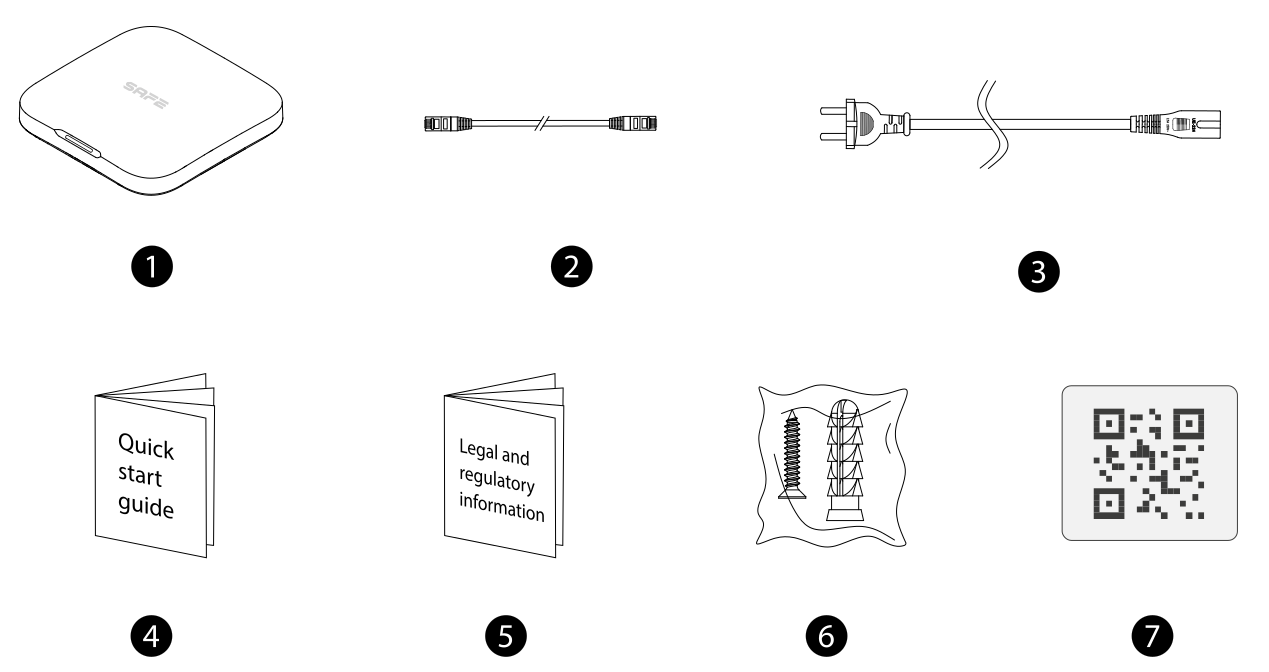
- SAFE Rep Repeater – 1 pcs
- Ethernet Cable – 1 pcs
- Power Cable – 1 pcs
- Quick user guide – 1 pcs
- Legal and regulatory information – 1 pcs
- Mounting kit (screws, wall plugs) – 1 set
- QR code with the user manual – 1 pcs
Safety Notices
- Before use, check that the power supply is correct, and operate the device only within the rated power input range.
- Transport, use, and store the device only within the permitted temperature and humidity range.
- Do not let liquids drip or splash onto the device, and do not place any objects containing liquid on it.
- Strictly comply with local electrical safety regulations and standards. The supply voltage must be stable and match the requirements stated on the device label.
- Do not place the device where it is exposed to direct sunlight or near heat sources; keep it away from moisture, dust, and soot.
- Place the device in a well-ventilated location and do not block its ventilation.
- Use only the power cable supplied by the manufacturer. Do not connect the power cable to the device while it is already energized, and do not disconnect it while the device is operating.
- The device contains a built-in rechargeable battery – do not throw it into fire, and do not mechanically crush or cut it, as this may cause an explosion or leakage of flammable liquids and gases.
- Do not dispose of the product with regular household waste – hand it in for recycling through the electrical equipment take-back system.
Warranty
The SAFE Rep device is covered by a warranty 36 months from the date of sale. The warranty does not cover defects caused by failure to follow the instructions provided in this manual.
If you experience any problems with the device, contact technical support first – most situations can be resolved remotely.
Need Help?
SAFE HOME europe technical support:
Email: info@safe-home.eu · Phone: (+420) 581 222 262
Website: www.smart-safe.eu