
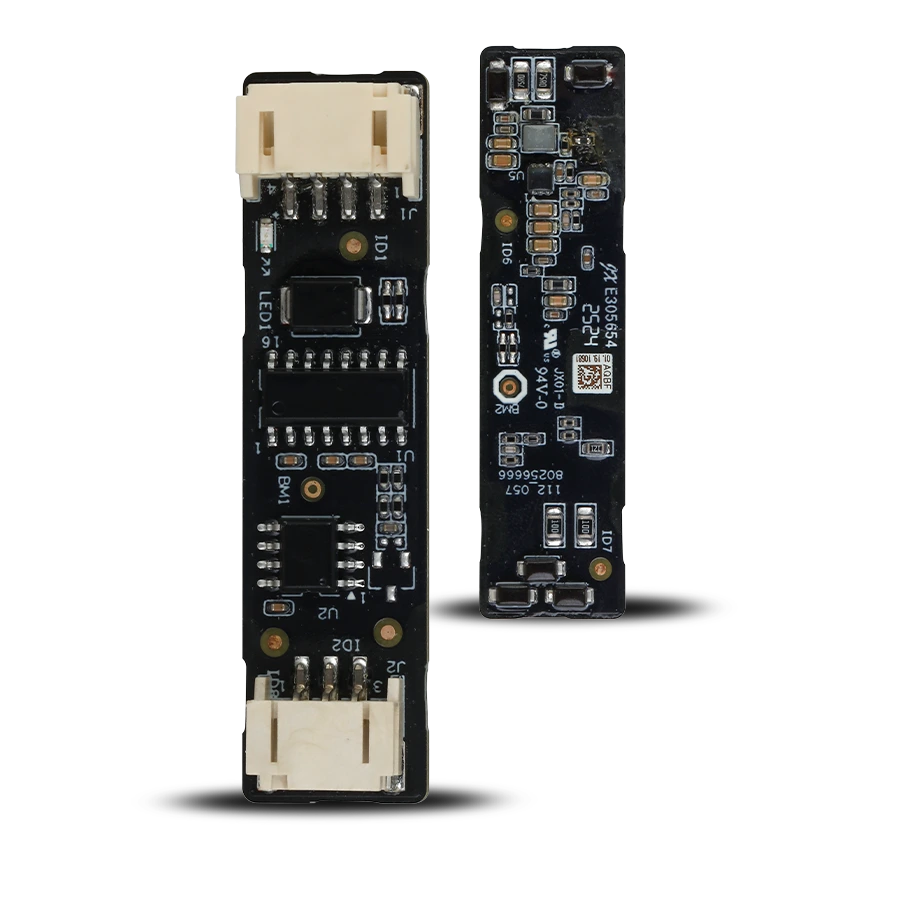
SAFE Serial Bridge is a small converter that plugs directly onto the Hub's serial port Hub 2 Plus LTE and changes its interface RS-232 to a bus RS-485. Only with it can wired expansions – modules IO Expander Board a IO Relay Board, of which up to 16. A purely wireless Hub thus becomes a hybrid one. The module needs no power supply or configuration of its own; it draws power from the port it is plugged into.
Foreword
General
This user manual describes the installation, functions and operation of the serial signal converter (hereinafter the “converter”). Read the manual carefully before using the device and keep it for future reference.
Safety instructions
The following signal words may appear in the user manual:
| Signal word | Meaning |
|---|---|
| NEBEZPEČÍ | Indicates a high potential hazard which, if not avoided, may result in death or serious injury. |
| VAROVÁNÍ | Indicates a medium or low potential hazard which, if not avoided, could result in minor or moderate injury. |
| UPOZORNĚNÍ | Indicates a potential risk which could lead to property damage, data loss, reduced performance or an unpredictable result. |
| TIP | Provides methods to help you solve a problem or save time. |
| POZNÁMKA | Provides additional information, such as emphasis or a supplement to the text. |
Revision history
| Version | Revision content | Release date |
|---|---|---|
| V1.0.1 | First release. | September 2026 |
| V1.0.2 | Technical specifications corrected according to the manufacturer's documents. | October 2026 |
| V1.0.3 | Added illustrations from the graphic designer. | October 2026 |
Privacy notice
As a user of the device or a data controller, you may collect the personal data of others, such as their face, fingerprints and licence plate number. You must comply with local privacy protection laws and regulations in order to protect the legitimate rights and interests of other people by taking measures which include, but are not limited to: providing clear and visible identification to inform people of the existence of the monitored area and providing the required contact information.
About the manual
- The user manual serves as a reference only. Minor differences may occur between the information provided and the product.
- We are not liable for damage resulting from use of the product in a manner that is not in accordance with the instructions in the user manual.
- The manual will be updated in line with the current laws and regulations of the relevant countries. For detailed information, see the printed user manual, scan the QR code or visit our website. The manual is for information purposes only. The electronic and printed versions may differ in minor details.
- All designs and software may be changed without prior written notice. As a result of product updates, certain differences may appear between the product and the information in the manual. The latest version of the software and supplementary documentation is available from customer service.
- Printing errors or deviations may occur in the description of functions, operations and technical data. In case of doubt or dispute, we reserve the right of final interpretation. If the manual (in PDF format) cannot be opened, update your reader software or try another common reader.
- All trademarks, registered trademarks and company names in the manual are the property of their respective owners.
- If any problems occur while using the device, visit our website, or contact your supplier or customer service.
- In case of ambiguity or dispute, we reserve the right of final interpretation.
Important precautions and warnings
This section contains information on the correct handling of the product, risk prevention and prevention of property damage. Read it carefully before using the device and follow the instructions provided while using it.
Operating requirements
- Before use, make sure the device's power supply is working properly.
- Do not unplug the device's power cable while it is switched on.
- Use the device only within its rated power range.
- Transport, use and store the device under the permitted humidity and temperature conditions.
- Prevent liquids from splashing or dripping onto the device. Make sure there are no objects filled with liquid on the device, to prevent liquids from entering it.
- Do not disassemble the device.
Installation requirements
- Connect the device to the power adapter before switching it on.
- Strictly comply with local electrical safety standards and make sure the voltage in the area is stable and matches the device's power requirements.
- Do not connect the device to more than one power source. Otherwise, the device could be damaged.
- When working at height, follow all safety procedures and use the required protective equipment.
- Do not expose the device to direct sunlight or sources of heat.
- Do not install the device in damp, dusty or smoky locations.
- Install the device in a well-ventilated location and do not block its ventilation.
- Use the power adapter or power supply provided by the device manufacturer.
- The power supply must meet the ES1 requirements of IEC 62368-1 and must not exceed PS2. The power supply requirements are governed by the device's rating label.
- Connect Class I electrical appliances to a socket with protective earthing.
Functional elements
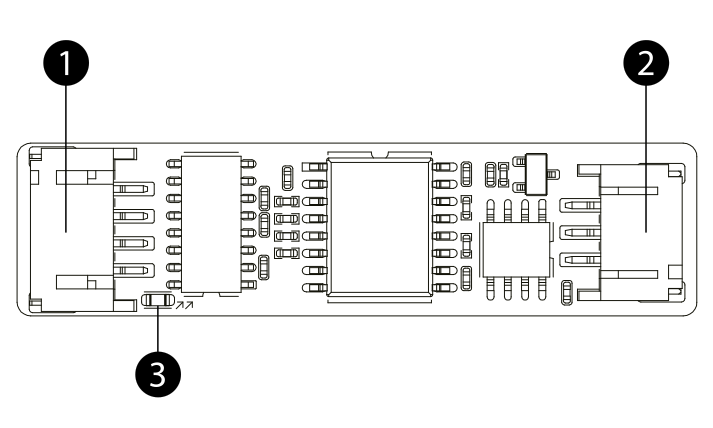
- RS-232 input port – plugs directly onto the Hub's serial port, from which the module is also powered.
- RS-485 output port – the bus to the expansion modules runs from it.
- Power LED indicator – lights up when the module is powered from the Hub.
Principle of operation
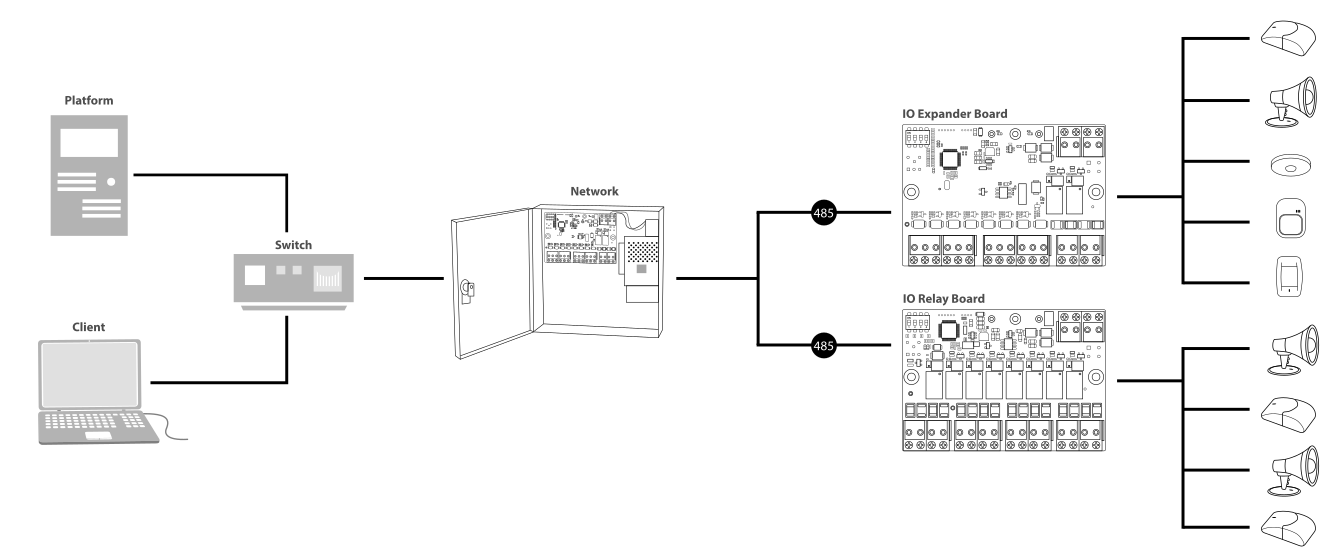
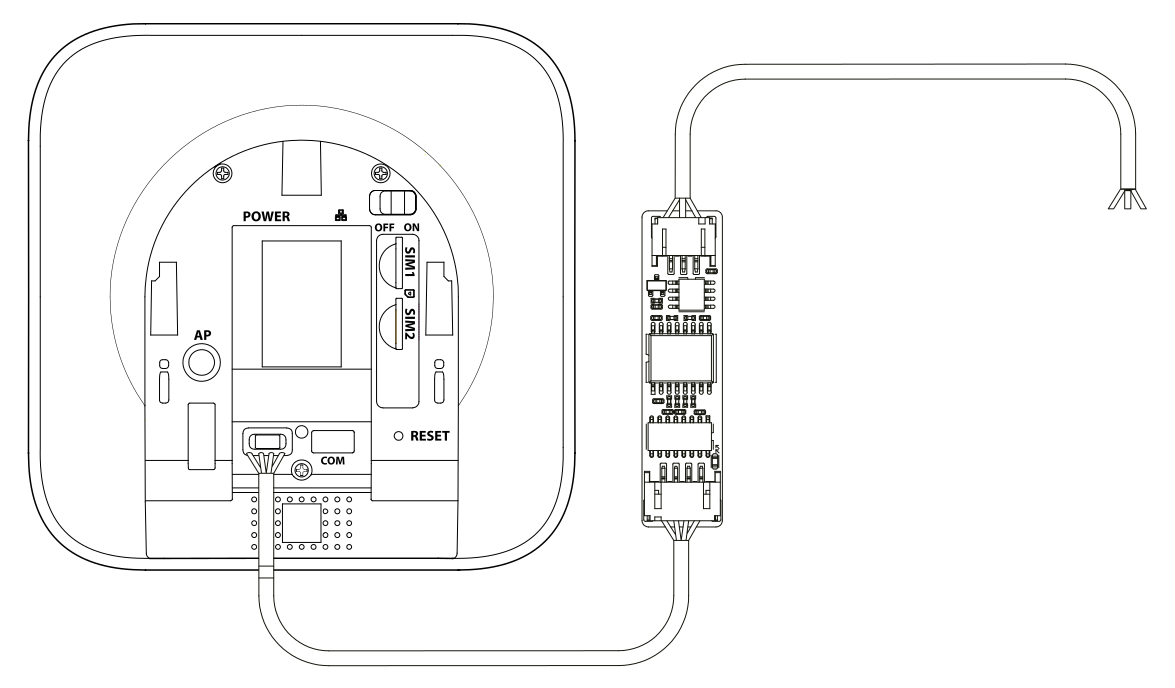
Hub Hub 2 Plus LTE has a serial port on its board RS-232, but the expansion modules communicate over the bus RS-485. The Serial Bridge bridges this difference: it plugs onto the Hub's serial port and converts its signals to RS-485, to which the wired expansions are then connected. This turns a purely wireless Hub into a hybrid one.
What it is for
The converter makes it possible to connect to the Hub bus modules that extend the system with wired inputs and outputs – SAFE IO Expander Board (8 inputs and 2 outputs) and SAFE IO Relay Board (8 outputs). On a single bus there can be up to 16 in any combination. Magnetic contacts, sirens, detectors and automation elements from other manufacturers can thus be incorporated into the system without changing the existing equipment.
Power supply
The module has no power terminals or battery of its own – it draws power from the Hub's serial port. It therefore requires no additional power source and, in the event of a Hub power failure, behaves like the rest of the system.
Installation and wiring
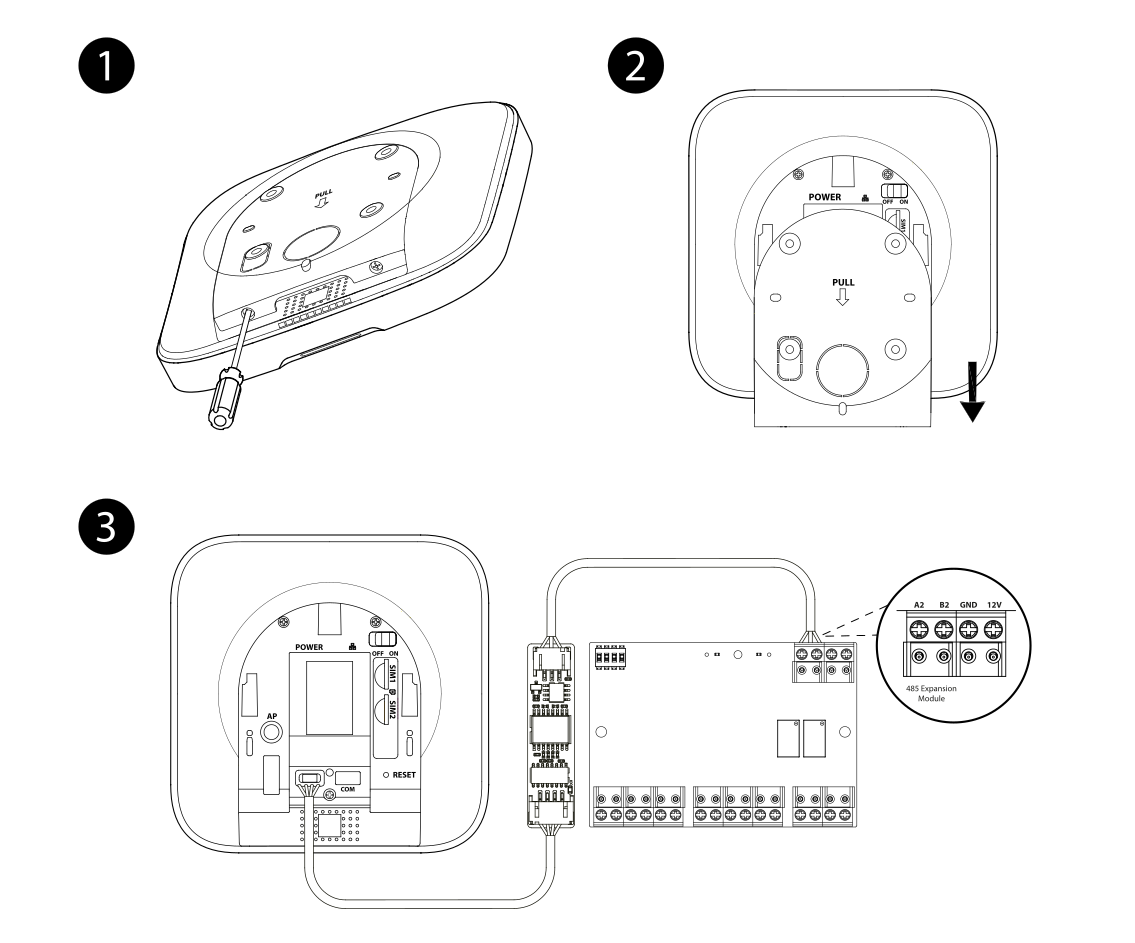
- Loosen the screws on the underside of the Hub.
- Remove the Hub panel by pulling it downwards.
- Plug the converter onto the serial port RS-232 on the Hub board.
- Route the bus cable RS-485 out of the Hub through the cable gland and connect it to the corresponding terminals of the expansion module.
- Put the Hub panel back and tighten the screws.
- Connect the Hub to power and check that the LED indicator on the converter lights up.
Statuses
| Indication | Meaning |
|---|---|
| LED on | The module is powered from the Hub's serial port |
| LED off | The Hub is without power, or the converter is not correctly seated on the port |
Maintenance
- The module does not require regular maintenance. Whenever you work on the Hub, check that the converter is seated on the port and that the bus cable has not been pulled out.
- Do not clean the board with liquids; remove dust with dry compressed air.
- Before handling, discharge yourself by touching an earthed object – the board is sensitive to static electricity.
Technical specifications
| Interface | |
| RS-232 port | 1× input port |
| RS-485 port | 1× output port |
| Optical indication | 1× power LED indicator |
| General | |
| Power supply | From the RS-232 port of the Hub (Hub 2 Plus LTE) |
| Operating temperature | −10 °C to +55 °C |
| Operating humidity | 10 % – 90 % RH, non-condensing |
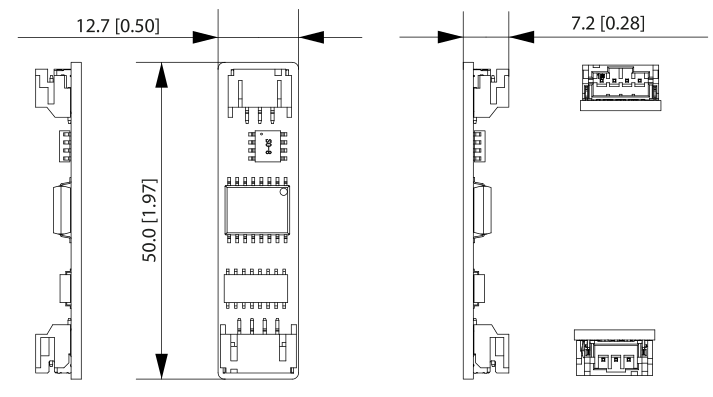
| Dimensions | 50 × 12.7 × 7.2 mm |
| Weight (net) | 5,21 g |
| Weight (gross) | 50 g |
| Installation | To cable ducts or an installation box |
| Compatibility | Hub 2 Plus LTE SAFE 38300; IO Expander Board SAFE 38182; IO Relay Board SAFE 38183 |
| Compliance | CE; EN 55032:2015+A1:2020; EN 61000-3-2:2019+A1:2021+A2:2024; EN 61000-3-3:2013+A1:2019+A2:2021; EN 55035:2017+A11:2020; EN 50130-4:2011+A1:2014; IEC 62368-1:2023 / EN IEC 62368:2024+A11:2024; EN IEC 63000:2018 |
| Model designation | SAFE 38181 |
| EAN code | 0728204235102 |
Package contents
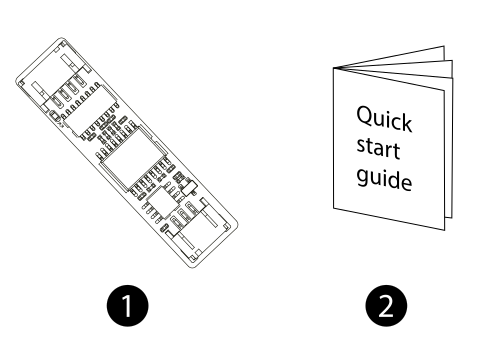
- SAFE Serial Bridge converter – 1 pc
- Quick user guide – 1 pc
Safety notices
- The module is intended for indoor environments and for the permitted temperature and humidity range (−10 °C to +55 °C, 10 % – 90 % RH, non-condensing).
- Always disconnect the power supply – of the Hub and of the module – before wiring.
- Do not disassemble the device or interfere with the printed circuit board; protect it from moisture, dust and static electricity.
- Observe local electrical regulations. Have the connection to the mains wiring carried out by a qualified electrician.
- Do not dispose of the product with ordinary municipal waste – hand it in for recycling in the electrical equipment take-back system.
Warranty
A warranty is provided on the SAFE Serial Bridge device 36 months from the date of sale. The warranty does not cover defects caused by failure to follow the instructions given in this manual.
In case of problems with the device, first contact technical support – most situations can be resolved remotely.
Need help?
SAFE HOME europe technical support:
E-mail: info@safe-home.eu · Telephone: (+420) 581 222 262
Web: www.smart-safe.eu